
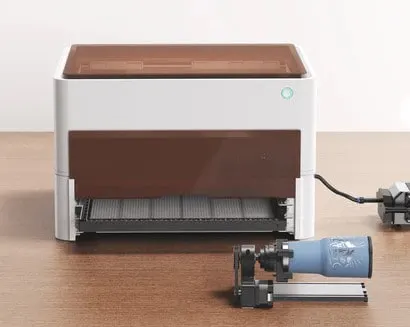
If you’re a hobby engraver then you know how amazing the Beamo cutting machine is.
Beamo is a small desktop CO2 laser cutter and engraver. It features a powerful 30-watt CO2 laser that can cut and engrave on organic materials and even engrave select metal.
It has a revolutionary design and intuitive user interface.
With all that Beamo has going for it, you can understand why it’s so popular with crafters.
It’s great for small projects, but it’s not the only player in the laser crafts game.
Many of its competitors see just how popular it has become and they are now offering other options that can do just as much if not more.
In this post, I’ll cover the best Beamo alternatives. I’ll break down the ease of use of each laser cutter, the price range, and the safety features.
No time to read the whole post? Here are my top 3 choices


I get commissions for purchases made through some of the links in this post. There is no extra cost to you. See my full disclosure here.
Beamo Competitors
So what if I told you that there are lots of ways to make beautiful laser cut designs? Well, there are. In fact, there are alternative machines that you’ve probably never heard of.
There are several different kinds of laser cutting machines available today. You can buy them online or at local retailers. One of the most popular models is the xTool.
But it’s not the only player in the game.
Many of its competitors see just how popular it has become and they are now offering other options that can do just as much if not more.
In this post, I’ll cover the best Beamo alternatives. I’ll break down the ease of use of each laser cutter, the price range, and the safety features.
What lasers are similar to Beamo?
The following laser cutting machines are similar to Beamo.
1. xTool P2
⚙️What does the xTool do?
xTool P2 is a diode DIY laser engraving and cutting machine. It’s just as good or better than Beamo because it includes a rotary engraver, high object engraving, and a super wide passthrough.
The P2 is the latest machine in the series of xTool desktop laser cutters.
It’s a powerful laser machine that can cut through a wide range of materials like
- transparent acrylic
- glass
- rubber
- wood.
This is thanks to the higher absorption efficiency of CO2 laser technology, which sets it apart from diode laser (wavelength 455nm).
What’s more, the passthrough feature allows you to engrave on long materials with a maximum thickness of 1.1 inches, and the machine’s compatibility with RA2 Pro enables you to engrave on tumblers, mugs, spheres, and rings with a maximum height of 2.7 inches. You can even engrave on higher objects by using the riser base, giving you the flexibility to create larger pieces.
But xTool P2’s features don’t stop there. The machine comes equipped with an AI camera featuring a long-range camera and a close-range camera, both with 16MP effective pixels and a vision precision of 0.3mm. This means you can capture even the smallest details of your design.
In addition, xTool P2 has a
- water-cooling system capacity of 1.4L
- adjustable air assist ranging from 15-150 Kpa
- exhaust fan with 145 CFM.
The machine is also easy to connect to via Wi-Fi, USB, or Ethernet, and is compatible with operating systems such as Windows, macOS, and iPadOS.
With xTool Creative Space and LightBurn control software, importing your designs in SVG, DXF, JPG, JPEG, PNG, or BMP format is a breeze. And with a processing precision of 0.01mm, you can expect nothing but high-quality results every time.
Overall, xTool P2 is an excellent investment and the perfect tool for unleashing your inner artist.
Pros:
Versatility: With its powerful 55W CO2 laser tube, xTool P2 can cut through a wide range of materials with ease, including transparent acrylic, glass, rubber, and wood. This makes it the perfect tool for hobbyists, entrepreneurs, and DIY enthusiasts alike.
Passthrough feature: The passthrough feature allows you to engrave on long materials with a maximum thickness of 1.1 inches, giving you the flexibility to create larger pieces.
Compatibility with RA2 Pro: xTool P2 is compatible with RA2 Pro, enabling you to engrave on tumblers, mugs, spheres, and rings with a maximum height of 2.7 inches.
AI camera: The machine comes equipped with an AI camera featuring a long-range camera and a close-range camera, both with 16MP effective pixels and a vision precision of 0.3mm. This feature enables you to capture even the smallest details of your design.
Water-cooling system: xTool P2 has a water-cooling system capacity of 1.4L, an adjustable air assist ranging from 15-150 Kpa, and an exhaust fan with 145 CFM. This ensures the machine stays cool and runs smoothly.
Cons:
Price: xTool P2 is a high-quality machine with a wide range of features, but this comes at a cost. It may not be the best option for those on a tight budget.
Size: With a product size of 39.4″×25.1″×10.6″ (1000×639×268mm) and a product weight of 45KG, xTool P2 is a relatively large machine. This may make it difficult to move or store in smaller spaces.
Noise: As with any laser cutter, xTool P2 can be quite noisy during operation. If you plan to use it in a shared space, you may need to take this into consideration.


2. M1 Desktop Laser
🤔 Is xTool M1 as good as Beamo?
Both the xTool M1 Desktop Laser and Blade Cutting Machine and the Beamo Laser engraver are great options for those looking to get started with laser cutting and engraving. However, there are some key differences between the two that may make one a better fit for your needs than the other.
Both machines can do both laser engraving and blade cutting. This opens up a wide range of possibilities for materials you can work with, giving you more flexibility to create a variety of projects. Some of these include
- wood
- glass
- metal
- acrylic
- stainless steel
- leather
The xTool M1 also boasts a very impressive motion accuracy of 0.01mm, which means you can expect highly precise cuts and engravings.
On the other hand, the Beamo is known for its integrated safety features
If you leave it open, the auto pause function stops the laser. It also has an internal water cooling system to keep the machine from overheating.
When it comes to size, both machines are compact and easy to store, with the xTool M1 measuring 22 x 18 x 9 inches and the Beamo measuring 24 x 17.5 inches.
Ultimately, the choice between the xTool M1 Desktop Laser and Blade Cutting Machine and the Beamo laser cutter will come down to your specific needs and preferences. If you’re looking for a machine that can handle a wide range of materials and tasks, the xTool M1 may be the better option.
Pros:
High precision: With a motion accuracy of 0.01mm, you can expect highly precise cuts and engravings.
Cons:
Requires techy know-how: While the xTool M1 is a powerful and versatile machine, it may require a bit more technical know-how to operate than some other desktop laser cutters.

3. LaserPecker 2
Laserpecker 2 is a good cheap laser engraver and is one of the best choices if you’re on a budget. Don’t be fooled by the price tag. In this case, cheap doesn’t mean low quality.
⛏️ What can you engrave with LaserPecker?
The LaserPecker 2 can engrave the following items
- Plastics
- Timber
- Glass
The LaserPecker app lets you engrave pictures onto cups, glasses, bags, cutting boards and more. Using the app, you can engrave photos in 4 easy steps.
- Choose an image from the app
- Edit your image
- Select engrave
- Engraving will start automatically


4. Muse 3D laser cutter
The 3D camera features set the FSL Muse 3D Autofocus Desktop CO2 Laser Cutter machine apart from the rest. You’ll be impressed by the RetinaEngrave v3.0 laser control and design software. The integrated software means that you don’t need an internet connection to use the laser machine. And you’ll be happy to know that it’s compatible with Google Chrome, Safari, Edge and Firefox
Muse desktop laser features:
- autofocus
- LCD touchscreen functions
- self-hosted browser based software
Pros: no internet required
Cons: Rotary attachment is not included – (you’ll have to buy this separately if you want to engrave cups)


5. OMTech 55W
Cutting thickness
The OMTech 55W offers numerous advantages in comparison to the Beamo engraver. For starters, you can cut thicker materials with this machine. The maximum cutting thickness is 0.63” whereas the maximum for the Beamo is 0.19″.
Pros: The higher cutting thickness means that you’ll be able to cut a wider variety of projects.
Cons: Does not include LightBurn Software


6. ORTUR Laser Master 2 ProS2-SF Laser Engraver
Wide Compatibility
Ortur laser master 2ProS2 laser engraver can be compatible with various mature engraving software, such as LaserGRBL, LightBurn, support Win XP / Win 7 / Win 8 / Win 10, and also support MAc and Linux system (LightBurn, need the paid version).
Engraving file format supports
- JPG
- PNG
- BMP
- JPEG
- SVG
Pros: The laser can use Lightburn which is amazing.
Cons: You’ll need to buy additional rollers if you want to engrave cups or cylindrical items.


7. ATOM STACK A5
A very complete and well-thought-out package. It’s easy to assemble and you’ll be able to use it very quickly. Make sure you read everything and research how to properly use diode lasers.
Pros: LaserGRBL is simple enough to figure out And it accepts a large variety of images, from svg to jpg.
Cons: There is a lot of terminology to learn.


8. Dremel Digilab LC40
⚙️Who makes the Dremel laser cutter?
The Dremel company is the original and official maker of the Dremel laser cutter. They’ve been developing machines for over 85 years.
The most popular is the Digilab LC40. It features a simple printing process: place the material, select its settings, and print. It comes with easy-to-use software and is perfect for cutting, scoring, and engraving a variety of hard and soft materials.
Here are a few of the materials that you can use with it:
- Wood
- Glass
- stone,
- paper,
- Fabric
- leather
Pros: features a cooling and air assist system
Cons: discontinued


Want to save this for later?
Feel free to save this post to your favorite DIY board on Pinterest!
Explore Your Options: Discover the Best Laser Cutting Machines to Replace Your Beamo
If you’re someone who loves to create and design, then you know that having the right tools is essential to bringing your ideas to life. While the Beamo is a popular choice for laser cutting, it’s important to know that there are other machines out there that can offer even more flexibility and precision.
Let’s take a look at some of the top options:
The xTool P2 is a fantastic choice for those who want a powerful machine that can handle a variety of materials. With its CO2 laser tube and passthrough feature, you can easily cut, engrave, and score almost anything. Plus, the AI camera and user-friendly software make designing a breeze.
For those who need even more versatility, the xTool M1 Desktop Laser and Blade Cutting Machine is an excellent option. This hybrid machine can both laser engrave and blade cut, giving you even more options when it comes to creating. While it may require a bit more technical know-how, the precision and flexibility make it well worth the investment.
If you’re on a tight budget, the LaserPecker 2 is an excellent choice. Despite its lower price point, this machine is still able to engrave on a variety of materials, including plastic, timber, and glass. And with the easy-to-use app, you can easily engrave photos and designs on a variety of objects.
No matter what your needs are, there’s a laser cutting machine out there that can help you bring your designs to life. Whether you’re a creative hobbyist or an entrepreneur looking to start a business, investing in the right machine can make all the difference.
So why wait any longer? Take the first step towards unleashing your creativity by exploring these fantastic laser cutting machines today!
