
Let’s talk about laser cutting machines. You know, those magical devices that can transform your DIY projects from average to amazing in a snap.
Epilog Zing 16 machines have been a fan favorite for a while now and for good reason. Proudly made in the USA, these machines are top-notch.
But wait, hold on a sec. Did you know that there are other laser cutting machines out there that can give the Epilog Zing 16 a run for its money?
Yep, you heard that right. You don’t have to go on a wild goose chase looking for an old cutting machine for sale. Instead, you can check out these awesome alternative machines that you probably haven’t heard of yet.
Now, I know what you’re thinking. “What other machines could possibly be as great as the Epilog Zing 16?” Well, my friend, let me tell you, there are some serious contenders out there.
You’ve got options, and I’m here to break them down for you.
Sure, the Epilog Zing 16 may be a legacy machine, but that doesn’t mean it’s the only player in the game. Many of its competitors have taken notice of its popularity and are stepping up their game.
So without further ado, let’s dive into the best Epilog Zing 16 alternative laser cutting machines. We’ll cover everything from ease of use to price range to safety features.
Get ready to discover some new favorites and take your crafting game to the next level!
No time to read the whole post? Here are my top 3 choices


I get commissions for purchases made through some of the links in this post. There is no extra cost to you. See my full disclosure here.
What lasers are similar to Epilog Zing?
The following laser cutting machines are similar to Epilog Zing.
1. xTool P2
⚙️What does the xTool do?
xTool P2 is a diode DIY laser engraving and cutting machine. It’s just as good or better than Epilog Zing because you can also get a rotary engraver, high object engraving, and a super wide passthrough.
The P2 is the latest machine in the series of xTool desktop laser cutters.
It’s a powerful laser machine that can cut through a wide range of materials like
- transparent acrylic
- glass
- rubber
- wood.
This is thanks to the higher absorption efficiency of CO2 laser technology, which sets it apart from diode laser (wavelength 455nm).
What’s more, the passthrough feature allows you to engrave on long materials with a maximum thickness of 1.1 inches, and the machine’s compatibility with RA2 Pro enables you to engrave on tumblers, mugs, spheres, and rings with a maximum height of 2.7 inches. You can even engrave on higher objects by using the riser base, giving you the flexibility to create larger pieces.
But xTool P2’s features don’t stop there. The machine comes equipped with an AI camera featuring a long-range camera and a close-range camera, both with 16MP effective pixels and a vision precision of 0.3mm. This means you can capture even the smallest details of your design.
In addition, xTool P2 has a
- water-cooling system capacity of 1.4L
- adjustable air assist ranging from 15-150 Kpa
- exhaust fan with 145 CFM.
The machine is also easy to connect to via Wi-Fi, USB, or Ethernet, and is compatible with operating systems such as Windows, macOS, and iPadOS.
With xTool Creative Space and LightBurn control software, importing your designs in SVG, DXF, JPG, JPEG, PNG, or BMP format is a breeze. And with a processing precision of 0.01mm, you can expect nothing but high-quality results every time.
Overall, xTool P2 is an excellent investment and the perfect tool for unleashing your inner artist.
Pros:
Versatility: With its powerful 55W CO2 laser tube, xTool P2 can cut through a wide range of materials with ease, including transparent acrylic, glass, rubber, and wood. This makes it the perfect tool for hobbyists, entrepreneurs, and DIY enthusiasts alike.
Passthrough feature: The passthrough feature allows you to engrave on long materials with a maximum thickness of 1.1 inches, giving you the flexibility to create larger pieces.
Compatibility with RA2 Pro: xTool P2 is compatible with RA2 Pro, enabling you to engrave on tumblers, mugs, spheres, and rings with a maximum height of 2.7 inches.
AI camera: The machine comes equipped with an AI camera featuring a long-range camera and a close-range camera, both with 16MP effective pixels and a vision precision of 0.3mm. This feature enables you to capture even the smallest details of your design.
Water-cooling system: xTool P2 has a water-cooling system capacity of 1.4L, an adjustable air assist ranging from 15-150 Kpa, and an exhaust fan with 145 CFM. This ensures the machine stays cool and runs smoothly.
Cons:
Price: xTool P2 is a high-quality machine with a wide range of features, but this comes at a cost. It may not be the best option for those on a tight budget.
Size: With a product size of 39.4″×25.1″×10.6″ (1000×639×268mm) and a product weight of 45KG, xTool P2 is a relatively large machine. This may make it difficult to move or store in smaller spaces.
Noise: As with any laser cutter, xTool P2 can be quite noisy during operation. If you plan to use it in a shared space, you may need to take this into consideration.


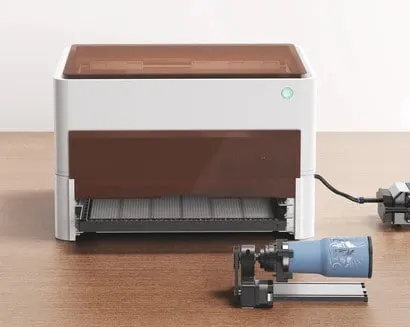
2. M1 Desktop Laser
🤔 Is xTool M1 as good as Epilog Zing?
Both the xTool M1 Desktop Laser and Blade Cutting Machine and the Epilog Zing Laser Cutter are great options for those looking to get started with laser cutting and engraving. However, there are some key differences between the two that may make one a better fit for your needs than the other.
One of the biggest advantages of the xTool M1 is that it is a hybrid machine, which means it can both laser engrave and blade cut. This opens up a wide range of possibilities for materials you can work with, giving you more flexibility to create a variety of projects. The xTool M1 also boasts a very impressive motion accuracy of 0.01mm, which means you can expect highly precise cuts and engravings.
When it comes to size and weight, here’s how they stack up:
| Brand | xTool M | Epilog Zing 16 |
| Weight | 21.6 lbs (9.8kg) | 95 lbs (43 kg) |
| Machine Dimensions | Width: 21.9” x Depth: 17.5” x Height: 9” (557mm x 446mm x 230 mm) | Width: 28.75″ x Depth: 22.125” x Height: 11.75” (730 x 562 x 298 mm) |
Ultimately, the choice between the xTool M1 Desktop Laser and Blade Cutting Machine and the Epilog Zing 16 will come down to your specific needs and preferences. If you’re looking for a machine that can handle a wide range of materials and tasks, the xTool M1 may be the better option.
Pros: Weighing in at 9.8kg, the xTool M1 is lighter than the Epilog Zing 16 laser cutter.
Cons: While the xTool M1 is a powerful and versatile machine, it may require a bit more technical know-how to operate than some other desktop laser cutters.

3. LaserPecker 2
Laserpecker 2 is a good cheap laser engraver and is one of the best choices if you’re on a budget. Don’t be fooled by the price tag. In this case, cheap doesn’t mean low quality.
⛏️ What can you engrave with LaserPecker?
The LaserPecker 2 can engrave the following items
- Plastics
- Timber
- Glass
The LaserPecker app lets you engrave pictures onto cups, glasses, bags, cutting boards and more. Using the app, you can engrave photos in 4 easy steps.
- Choose an image from the app
- Edit your image
- Select engrave
- Engraving will start automatically


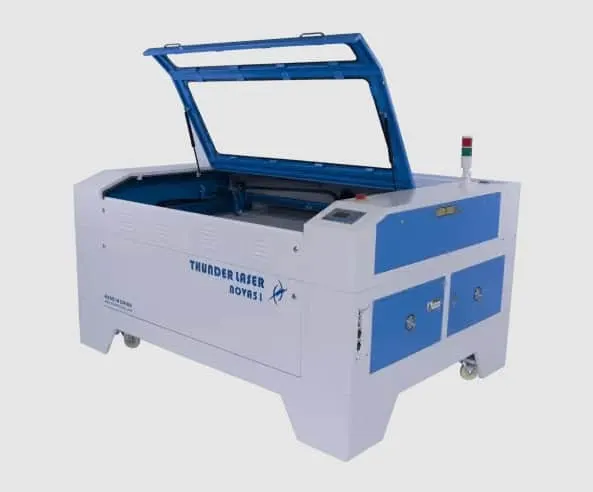
4. Laser Thunder Nova 51
Laser Thunder is not only Epilog Zing 16’s competitor when it comes to performance but also when it comes to customer support.
This co2 laser engraving system is known for its outstanding customer service. When you’re spending that kind of money on a machine you want the peace and comfort that comes with knowing that someone reliable and competent is always on hand to help you out in case of any questions or hiccups.
Pros: Highly rated for its customer service
Cons: Lesser known

5. Dremel Digilab LC40
⚙️Who makes the Dremel laser cutter?
The Dremel company is the original and official maker of the Dremel laser cutter. They’ve been developing machines for over 85 years.
The most popular is the Digilab LC40. It features a simple printing process: place the material, select its settings, and print. It comes with easy-to-use software and is perfect for cutting, scoring, and engraving a variety of hard and soft materials.
Here are a few of the materials that you can use with it:
- Wood
- Glass
- stone
- paper
- Fabric
- leather
Pros: features a cooling and air assist system
Cons: discontinued


6. 90W RECI CO2 Laser Engraver and Cutter
Just like with Epilog Zing 16, here is what can you cut and engrave with the 90W RECI CO2:
- Wood
- Paper
- Cloth
- Acrylic
Benefits of the machine
- Specialized design concept, tailored to users in different industries, reasonable structure, beautiful appearance and practicality.
- The profile cast by the high-precision mold has a high strength, high stability mechanical structure, stable numerical control movement, high speed, high precision. The design concept of front-to-back penetration of the machine body can facilitate front-to-back feeding, and is suitable for processing unlimited length workpieces.
- Advanced industrial cooling system and automatic protection function without water alarm have improved the stability and safety of continuous work. Perfect dustproof and anti-pollution design greatly improves the stability of the whole machine.
- It adopts flight light path design, with unique structure, small light path deviation, high stability and convenient adjustment. Optical fittings use the highest quality imported mirrors and focusing mirrors, with the highest reflectivity and transmittance among similar fittings, thinner facula and stronger cutting force.
Pros: Cutting and engraving functions are very good.
Cons: Can be hard to find because it’s often out of stock.


7. ORTUR Laser Master 2 ProS2-SF Laser Engraver
Ortur laser master 2ProS2 laser engraver can be compatible with various mature engraving software, such as LaserGRBL, LightBurn, support Win XP / Win 7 / Win 8 / Win 10, and also support MAc and Linux system (LightBurn, need the paid version).
Engraving file format supports
- JPG
- PNG
- BMP
- JPEG
- SVG
Pros: The laser can use Lightburn which is amazing.
Cons: You’ll need to buy additional rollers if you want to engrave cups or cylindrical items.


8. ATOMSTACK A5
A very complete and well thought-out package. It’s easy to assemble and you’ll be able to use it very quickly. Make sure you read everything and research how to properly use diode lasers.
Pros: LaserGRBL is simple enough to figure out. And it accepts a large variety of images, from svg to jpg.
Cons: There is a lot of terminology to learn.


Want to save this for later? Pin it to your favorite DIY board on Pinterest!
Feel free to save this post to your crafting tips board on Pinterest so that you can come back to it later when you’re shopping for a new machine.
Conclusion
With so many options available, it can be overwhelming to choose the right one.
First and foremost, keep in mind that the perfect laser machine is the one that suits your specific needs and creative goals.
Do you need something portable that you can take with you on-the-go? Or maybe you’re on a tight budget and need a more affordable option? Perhaps you require a larger cutting area for bigger projects?
Whatever your needs may be, there’s a laser machine out there that’s perfect for you.
It’s crucial to take the time to do your research and compare each machine’s features and capabilities. Don’t be afraid to ask questions or seek out reviews from other crafters.
Remember, the more informed you are, the better equipped you’ll be to make the right choice.
And finally, don’t be afraid to take that leap of faith! Once you’ve found the laser cutting machine that’s perfect for you, dive in and start crafting.
With the right machine by your side, you’ll be amazed at what you can create.
So go ahead, let your creativity run wild, and start making new craft projects with a fantastic laser cutting machine. Happy crafting!
