
Want to know how to cancel your Cricut subscription? Many crafters find navigating the cancellation process as tricky as a complicated crafting project.
I’ll guide you step-by-step, making it as simple as creating your first paper flower.
Whether you’re adjusting your budget, changing your crafting focus, or just taking a break, I understand that sometimes, you just have to make choices about what to keep and what to get rid of.
Step-by-Step Guide to Cancel Cricut Access
1. Cancelling Through the Web Browser
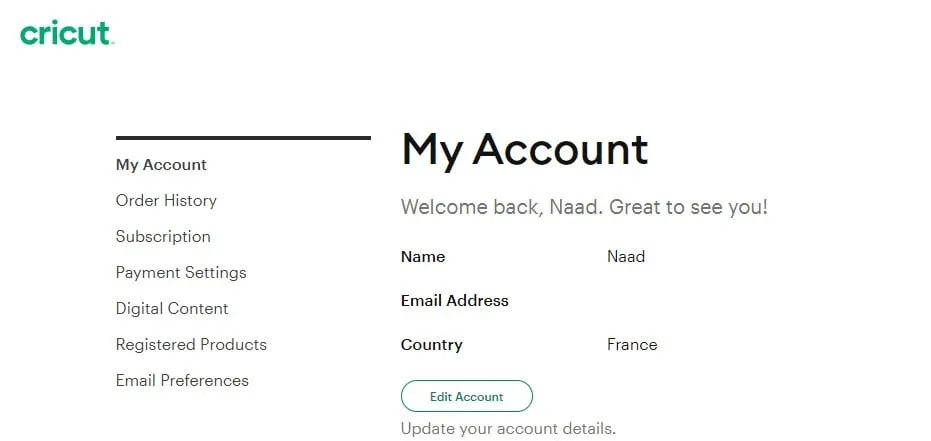
- Log into Your Cricut Account: Go to the Cricut website, and sign in.
- Navigate to the Drop-Down Menu: Find the drop-down under your profile and click on ‘Cricut Access plan’.
- Manage Your Subscription: Here, you’ll see options for your Cricut subscription. Look for the ‘Cancel’ option.
- Confirm Cancellation: Make sure to read through the details, so you know what happens next with your account.

2. Cancelling Through PayPal
- If you’ve used PayPal, log into your PayPal account and cancel the automatic payments to Cricut. Remember back in the day when you stopped your magazine subscription? It’s like that – easy once you know where to look!
To cancel a recurring Cricut subscription, follow these steps on the PayPal website:
- Go to Account Settings.
- Click Money, Banks and Cards.
- Click Manage Automatic Payments.
- Select the merchant (Cricut).


I get commissions for purchases made through some of the links in this post. There is no extra cost to you. See my full disclosure here.
Understanding the Consequences of Cancellation
What Happens to Your Current Projects?
- Your own designs and projects remain accessible, but you’ll lose access to Cricut’s exclusive library. It’s like keeping your creations but losing the key to a treasure chest of extras.
Access to Purchased and Free Designs
- You’ll still have your purchased designs and free images. Imagine it as your personal crafting library, minus the new releases.
This table outlines what changes you can expect before and after cancelling your Cricut Access subscription, regarding access to designs, project creation capabilities, and other benefits.
| Feature | With Cricut Access Subscription | After Cancelling Subscription |
|---|---|---|
| Access to Cricut Image Library | Full access to image sets and Cricut fonts | Limited or no access |
| Use of Exclusive Designs | Unlimited access to exclusive designs | Access only to previously purchased designs |
| Project Creation | Full capability to create and save new projects using Cricut’s collection | Can create projects using own designs and free content |
| Subscription Discounts | Discounts on Cricut.com purchases and free shipping offers | No discounts |
| Design Space Features | Full use of premium Design Space features | Restricted to free features in Design Space |
Weighing the Pros and Cons
Is Cricut Access Worth the Investment for Beginners?
- If you’re a Cricut newbie, think about how much you use the premium plan. Are you into creating lots of projects, or just dabbling?
Alternatives to Cricut Access
- There are plenty of free fonts and SVG files out there. Sometimes, branching out can give you more creative freedom.
There are several fantastic online platforms where you can find lots of cut files. Etsy and Design Bundles are prime examples.
Use Etsy to Make Cricut Projects
On Etsy, you’ll find a diverse range of sellers offering unique designs for various occasions – from holidays to special events, or even everyday moments.
It’s a great place to find personalized and creative designs.
Design Bundles Resources Similar to Cricut Access Images
Design Bundles, on the other hand, specializes in offering high-quality design resources, including a wide array of cut files suitable for different types of projects.
Their collection is extensive and often includes bundles that are cost-effective and versatile.
Both these platforms have so many options for crafters looking for new and exciting designs to work with, whether you’re using a Cricut machine or any other cutting tool.
These resources can help keep your crafting journey fresh and inspiring, even without a Cricut Access subscription.
Financial Considerations
Understanding the Cost of Cricut Access
- The monthly fee varies depending on the subscription plan you choose. It’s good to weigh if the cost matches how often you use your Cricut machine.
Refund Policies and Eligibility
- Generally, there’s no refund for the remaining time in your plan. It’s a bit like a gym membership – pay as you go.
Cricut Access and Your Crafting Journey
Making the Most of Cricut Without a Subscription
- You can still create amazing projects. Use your own images, system fonts, or free software for personal use.
- Selling your crafts? The Cricut Maker and Cricut Joy are great even without a subscription. Use your skills to turn a profit!
Maximizing Profits from Crafting
With or without a Cricut Access subscription, there are so many ways to make money using your Cricut machine.
Teaching others how to set up and use their Cricut is a fantastic way to share your knowledge and earn. You can create online tutorials, offer local workshops, or even create downloadable guides for beginners.
Additionally, selling your own crafted projects online is a lucrative option. Popular items include personalized home decor, custom apparel, and unique gift items.
How to Find Profitable Craft Ideas
Using platforms like Etsy or creating your own website can help you reach a wider audience.
When crafting for profit, consider the type of projects that have a high demand and low material costs. Some ideas include custom t-shirts, personalized tumblers, vinyl decals for home decor, and bespoke invitations or greeting cards.
Utilizing different plans and features available on the Cricut Design Space app, alongside a mix of free and premium cut files, can add diversity to your creations.
Remember, with a Cricut machine, you have the potential for total creative freedom. From using exclusive discounts on Cricut products to exploring the extensive Cricut image library, the possibilities are endless.
Whether you have a Cricut Access premium membership or use free content, your Cricut can be a key tool in turning your crafting hobby into a profitable venture.
Conclusion
Cancelling your Cricut Access membership isn’t as impossible as it seems.
Remember, whether you’re using a Cricut Explore Air or a new Cricut machine, you don’t necessarily need a Cricut Design Space subscription.
It’s not the only way to make stuff with it. Just your good old creativity will take you far, the sky’s the limit for your crafting adventures!
And if you’re wondering if your own projects could be money makers, I’ve got just the thing for you. Check out my list of the most profitable crafts to sell.
This could be a great way to make your crafting passion profitable.
