
Ever wondered what the best program for 3D printing is, especially when you’re itching to bring your crafting ideas to life?
I’ve been there, too—my son and I love building with Legos, and it got me thinking about creating our own 3D blocks.
I’ll tell you about the two main types of 3D modeling—NURBS and Polygon—and compare software options like Blender, FreeCAD, and Fusion 360.
Whether you’re a stay-at-home mom, a wannabe entrepreneur, or just love crafting, this will help you navigate the maze of 3D modeling software and set you on the right path.
No time to read the whole post? Here are my top picks
3-D Printer Software Resources
- Blender for Dummies (Most Popular – best for easy step-by-step instructions)
- FreeCAD Beginner Workbook (lots of practice tutorials)
- Fusion 360 Beginner Guide


I get commissions for purchases made through some of the links in this post. There is no extra cost to you. See my full disclosure here.
Why 3D Modeling Matters
3D modeling is more than just a cool tech skill; it’s a powerful tool that can bring your crafting projects to life.
From product design to creating unique gifts, the possibilities are endless.
But with so many software programs out there, how do you choose the best one for your needs?
Types of 3D Modeling
NURBS
- What is NURBS Modeling?
NURBS, or Non-Uniform Rational B-Splines, is a type of computer-aided design that uses complex mathematical equations to create 3D objects. It’s often used for advanced features in product design. - Pros and Cons
- Pros: High precision, ideal for mechanical parts and complex shapes.
- Cons: Steep learning curve, often not free software.
Polygon
- What is Polygon Modeling?
Polygon modeling, also known as mesh modeling, uses vertices, edges, and faces to create 3D models. It’s commonly used in video games and for simpler 3D prints. - Pros and Cons
- Pros: User-friendly interface, often open-source software.
- Cons: Less precise than NURBS, limited in creating complex designs.
Software Options
1. Blender
- Features: Blender offers a wide range of advanced features, including video editing and rapid prototyping. It’s a powerful program for both new users and advanced users.
- Learning Curve: Blender has a steep learning curve but offers various tools and tutorials to help you out.
- Cost: Good news! Blender is open-source software, making it a great choice for those on a budget.

2. FreeCAD
- Features: FreeCAD is best known for its mechanical design capabilities and support structures for various file formats.
- Learning Curve: FreeCAD has an intuitive interface but may require some time to master all its features. Do practice exercises to get used to the program.
- Cost: FreeCAD is also open-source software, making it a good option for personal use.

3. Fusion 360
- Features: Autodesk Fusion 360 is a powerful tool for product design, offering features like finite element analysis and complex mechanical design.
- Learning Curve: Fusion 360 offers ease of use with its user-friendly interface. If you’re just getting started, then a good beginner tutorial book with illustrations will make things easier.
- Cost: Fusion 360 offers a free trial, but the paid version unlocks more advanced capabilities.

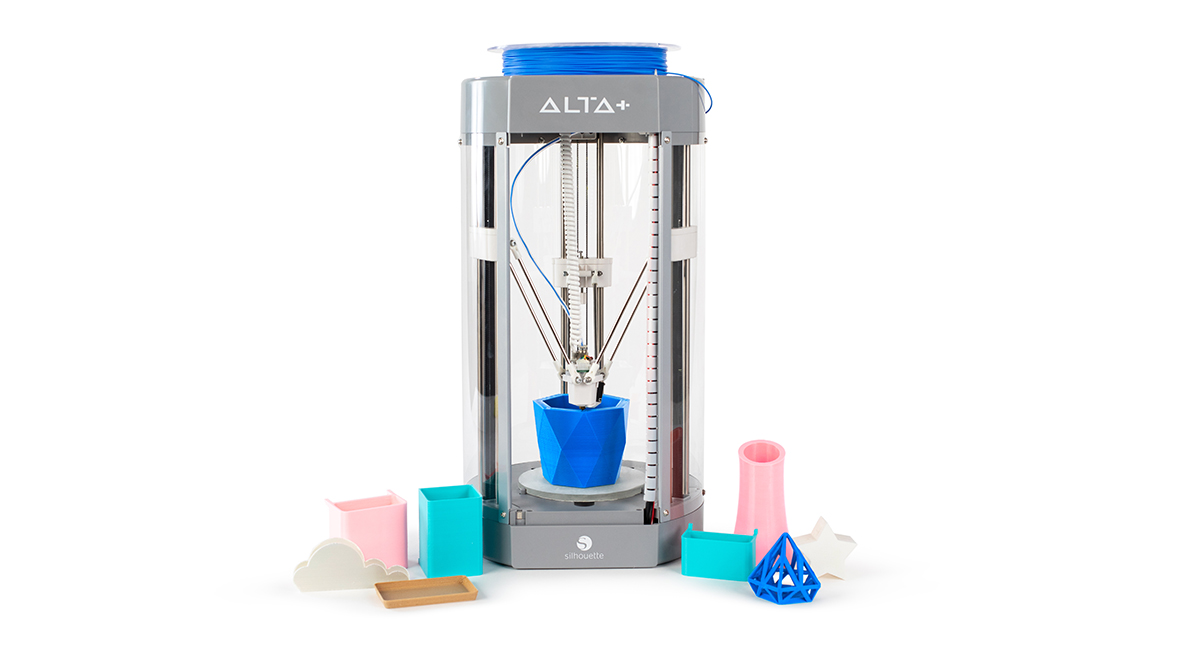
4. Silhouette Alta 3D Software
- Features: Silhouette Alta 3D Software is a top pick for crafters diving into the world of 3D printing. Designed to work exclusively with the Silhouette Alta 3D printer, this software offers a user-friendly interface where you can create, slice, and build your 3D models all in one place. Whether you’re interested in additive manufacturing or crafting unique 3D objects for educational purposes, this software has got you covered.
- Learning Curve: The best part about Silhouette Alta 3D Software is its ease of use, making it a good choice for those new to 3D printing. It offers a real-time preview feature that allows you to see how your project will print layer by layer, giving you the chance to make adjustments before the printing process begins. This simplifies the 3D printing process, especially for new users.
- Cost: If you’re looking for budget-friendly options, you’ll be pleased to know that Silhouette Alta 3D Software comes free with the purchase of a Silhouette Alta 3D printer. The software is compatible with various operating systems, broadening its accessibility.
- File Compatibility: Silhouette Alta 3D Software supports a range of file formats, allowing you to import designs from your Silhouette Library or other sources. This flexibility is particularly useful for those who want to use the software for different types of projects.
5. Ultimaker Cura
- Features: Ultimaker Cura stands out as one of the best software options for 3D printing. It’s an open-source slicing software that allows you to navigate through your 3D models in a user-friendly interface. The software is packed with advanced features, including the ability to add various extensions for enhanced functionality. Whether you’re working on architectural design or creating physical objects, Ultimaker Cura is a versatile modeling tool.
- Learning Curve: The best part about Ultimaker Cura is its intuitive user interface, making it a good choice for both newbies and mechanical engineers. It offers preset quality options, simplifying the 3D printing process for new users. For those looking to refine their 3D prints, the software provides a wide array of customizable settings, allowing you to tailor the printing program to your specific machine.
- Cost: One of the best options for those on a budget, Ultimaker Cura offers a free version that you can download directly from their official website. It’s compatible with various operating systems, making it accessible to a broad audience.
- File Compatibility: Ultimaker Cura supports multiple file formats, including STL files, which are commonly used in 3D modeling and computer-aided manufacturing.
- Additional Notes: If you’re using Blender for your 3D models, Ultimaker Cura offers seamless integration. The software also supports various printing materials and nozzle sizes, giving you the flexibility to choose what works best for your project. It’s an excellent choice for additive manufacturing and educational purposes.
Making an Informed Decision
When choosing the best 3D printing software, consider your skill level, the design process you’ll be undertaking, and the type of 3D objects you want to create.
Both free and paid versions have their pros and cons, so weigh your options carefully.
You can combine one modeling program with another and use them together. Ultimaker Cura is one that does that.
The great thing about it is that you can enhance the program by adding extensions from the marketplace, such as Cura from Blender and cylindric custom supports.
Where to Start Your 3D Modeling Journey
Not into reading books? Then you can also follow video courses. Platforms like Teachable and Skillshare offer courses in 3D modeling.

Online communities on Reddit and Facebook can also provide valuable insights and support.
Conclusion
Choosing the best program for 3D printing doesn’t have to be overwhelming. Whether you’re into crafting for fun or looking to monetize your skills, the right software can make all the difference.
My advice is to go with Blender, and then try out Ultimaker Cura with the extensions. The two of these make the perfect blend when it comes to ease of use and advanced capabilities.
Whether you’re a hobbyist or a professional, this software combo is a top choice for all your 3D printing needs.
If you’re as excited as I am about diving into the 3D printing world, you’ll love exploring all the creative possibilities it offers.
Once you’ve got the hang of the software, you can start practicing on small 3D projects. They’re fun, easy, and perfect for beginners.
