
So, you’re interested in a laser engraving machine for plastic, huh? I get it; the idea of etching your own designs into plastic materials is pretty tempting.
These tips will help you navigate the maze of options out there.
I’ll go over the types of machines, the materials they work best on, and even how to choose the right settings for your projects.
I’ve been down this road before. When I first got my tablet to digital drawing, I was kinda on the fence, you know? Like, “Is this thing really gonna be worth the cash?”
But guess what? Fast-forward a bit, and I’m not just drawing for fun—I’m actually selling my svg designs on Etsy! Yeah, that initial “should I or shouldn’t I” moment totally paid off.
No time to read the whole post? Here are my top picks
- xTool S1 – Best for safety
- Glowforge Plus – Very popular
- Ortur Laser Master 2 – Easy to use
I get commissions for purchases made through some of the links in this post. There is no extra cost to you. See my full disclosure here.

What is Laser Engraving?
Laser engraving is a process that uses a laser beam to etch designs onto various materials, including plastic.
The laser head moves over the work surface, directing the laser beam to remove surface layers and create intricate designs.
It’s a high-precision method that’s perfect for both personal and professional use.
What Do You Need for Laser Engraving?
- Essential Components: Apart from the laser tool, you’ll also need a cooling system, ventilation system, and laser software. Some of these come with the engraver depending on which one you pick.
- Materials: Make sure you have the right type of plastic material for the best result.
Types of Plastics for Laser Engraving
- ABS Plastics: Durable and versatile, great for automotive parts and medical devices.
- Acrylic: Ideal for high-contrast, clear acrylic sheet projects.
- Polyethylene: Commonly used for plastic parts in household items.
Why Choose a Laser Engraving Machine for Plastic?
High Efficiency and Speed
Laser engraving machines offer high efficiency and high speed, making them ideal for small businesses and mass production. The laser technology allows for quick engraving, even on complex and intricate designs.
Versatility
Laser engravers can work on different materials, not just plastic. You can also engrave on wood, stainless steel, and even precious metals. This makes them a versatile tool for various creative projects.
Premium Laser Machines for Less Than Half the Price
Affordable Options
Yes, it’s possible to get a high-quality laser engraving machine without breaking the bank. Lots of brands offer machines that are both efficient and affordable.
Top 10 Laser Cutters for Plastic Projects
Check out my list of the top 10 laser cutters suitable for plastic.
1. xTool S1
The xTool S1 is a game-changer in the world of laser engraving. With first-class laser safety certification and an enclosed design, it offers four-tier safety protection.
The machine boasts up to 40W high power and stable performance at 600mm/s. Its revolutionary tech includes twin-point positioning for camera-like precision and a full-scene autofocus system.
This makes it easy to see the image that you want to engrave.
It’s a newer machine so, you may not find as many tutorials on how to use it just yet. Nevertheless, it’s made with beginners in mind, so the learning curve is pretty small.


2. Glowforge Plus
This is a popular machine in crafting circles. Known for its high precision and user-friendly interface, the Glowforge Plus is a great option for both beginners and professionals.


3. Ortur Laser Master 2
Affordable and compact, the Ortur Laser Master 2 is ideal for hobbyists who are just getting started with laser engraving.


4. Dremel LC40
With a robust construction and high-speed laser head, the Dremel LC40 offers high efficiency and is perfect for small businesses. But, it’s been discontinued by the manufacturer.


5. TEN-HIGH CO2 Engrave Machine
This machine offers a large working area and is suitable for various materials, including different types of plastics.

6. BIBO 3D Printer and Laser Engraver
This 2-in-1 machine is perfect for those who are looking for both a 3D printer and a laser engraver. Just be aware that it’ll take some time to switch from the 3D printer function to the laser engraver.
7. VEVOR Laser Engraver
VEVOR offers a range of laser engravers with different power options, providing a versatile choice for different project needs. The air assist feature helps you avoid getting burned edges on your project.
8. CNCShop Laser Engraving Machine
This machine offers high precision and efficiency, making it suitable for both personal and professional use. It takes a bit of time to set up, but once you’ve got it going, it works like a dream.
The exhaust fan is a tad too big for the job, but no worries! You could put some duct tape on half of the fan intake and seal it up with some weather seal or foam to make sure there are no leaks.
But that’s a temporary fix at best.
9. Universal Laser Systems VLS3.60DT
Known for its high-quality components and advanced control system, this machine is ideal for those who require high precision.


But it’s probably better if you have large, industrial quantities of plastic to engrave.
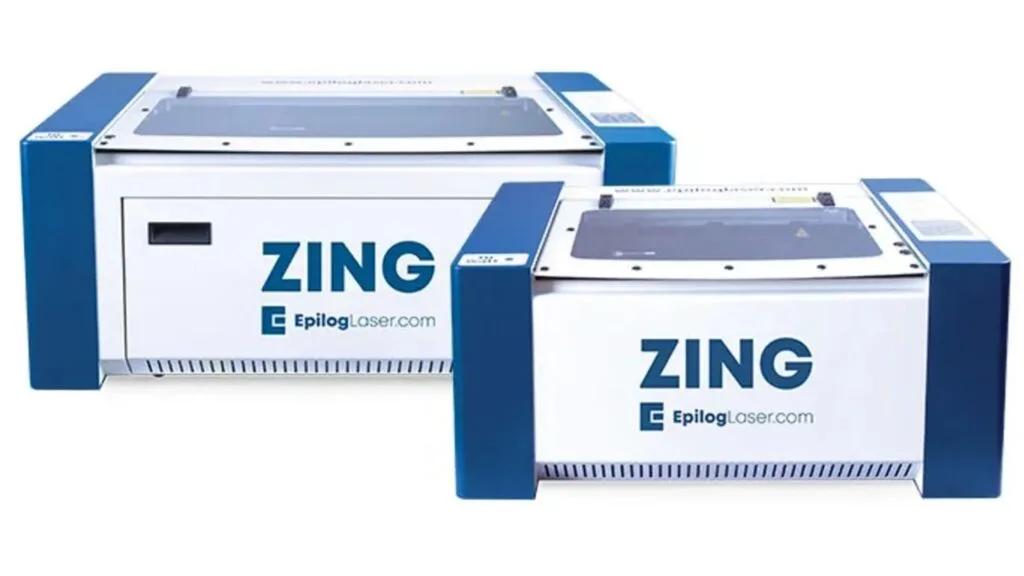
10. Epilog Laser Zing Series
The Zing series offers high-quality engraving at an affordable price point, making it a popular choice among small businesses and hobbyists.


Tips for Successful Laser Engraving on Plastic
- Test First: Always do a test run on a scrap piece of the type of plastic you plan to engrave.
- Proper Ventilation: Ensure your workspace is well-ventilated to remove any harmful fumes generated during the plastic engraving process.
- File Format: Make sure your design file format is compatible with the laser engraving machine’s software.
| Laser Cutter | Key Features | Suitable for Types of Plastics |
|---|---|---|
| xTool S1 | High power, four-tier safety, full-scene autofocus | ABS, Acrylic, Polyethylene |
| Glowforge Plus | High precision, user-friendly | ABS, Acrylic |
| Dremel LC40 | Robust, high-speed laser head | ABS, Polyethylene |
| Ortur Laser Master 2 | Affordable, compact | Acrylic, Polyethylene |
| TEN-HIGH CO2 | Large working area | ABS, Acrylic, Polyethylene |
Conclusion
Laser engraving on plastic is not just a trend; it’s an art form that’s here to stay. Whether you’re a hobbyist or looking to scale up your small business, a laser engraving machine can be a valuable asset.
So, are you ready to take your plastic projects to the next level?
If you’re wondering how to turn this newfound passion into a profitable venture, you’ll definitely want to check out my insights on how a laser engraving business can be profitable.
Trust me, it’s a read you won’t want to skip!
FAQs
- What are the key features to consider when choosing a laser engraving machine for plastic?
- Consider factors like power, bed size, and software compatibility.
- Are budget laser engraving machines suitable for professional use?
- They can be, but may have limitations in terms of power and durability.
- How do I maintain a laser engraving machine for plastic?
- Regular cleaning and following the manufacturer’s guidelines are crucial.
