
Beambox vs Glowforge, find out which of these laser cutting machines is right for you.
Laser cutting machines are getting more and more popular. They are great for home use and small business. If you’re into DIY crafting, you’ve probably thought about getting one.
In this blog post, I’ll cover the software, the hardware, the design possibilities, and of course the price of each laser engraver.

Glowforge – what to know about it
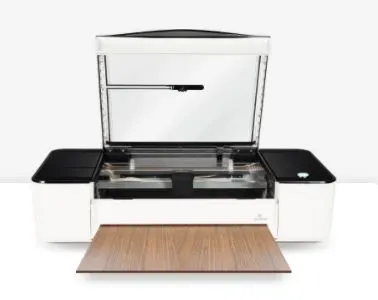
The Glowforge is a new type of laser cutting printer that uses light instead of heat to make various projects.
It’s designed for people who want to print, engrave and score things onto different materials, and it has an onboard camera to help you read the design templates, see a live preview and make your creations right away.
There are 3 different styles.
These are:
Glowforge Basic
As you can imagine the basic is your starter machine, the pro is the upgraded version and the Plus is the deluxe version.
But, each one is capable of printing on, engraving and cutting a wide range of materials like glass, wood, acrylic, leather, paper, thin plastic and even metal.
As you can already see, Glowforge is an all-in-one laser cutter.

Beambox – what to know about it
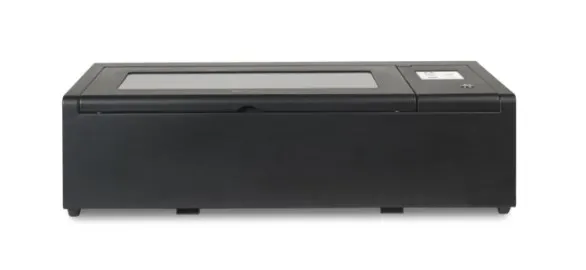
Flux Beambox is a 40W CO₂ smart desk top laser cutter and engraver that measures 800 x 670 x 250 mm.
Flux has four types of machines.
Flux Beamo
Beambox
Flux Beambox Pro
Hexa
Three things that you’ll love about the Beambox are the:
- Camera alignment – preview the work area and the workpiece on your laptop or phone
- High resolution full spectrum laser tube – smaller than the width of a human hair
- Wifi dongle USB
It can cut and engrave wood, fabric, acrylic, glass, metal and more.
This is great if you want to test out different materials.

1. Engraving Ability and Software
The Glowforge laser beam has a resolution of up to 1355 dpi (dots per inch), while Beambox only offers 1000 dpi.
This means that you can get more detailed images on your engraving than with the Beambox.
Beambox has laser power that engraves down to a 0.05 mm layer. It’s good for craft projects or small businesses that are just getting started.
Just like Glowforge, the Beam studio software works with Windows, MacOS and Linux.
You’ll upload your design files to the software in order to start your project.
You can make vector graphics (SVG) as well as JPG, PNG, DXF files yourself in Adobe Illustrator, Photoshop or an open-source software program like Inkscape.
2. Price Range
If you’re looking for something affordable, the Glowforge is pricier. The starting cost for the Basic model is $3995, compared to $3500 for the Beambox.
But, wait….there’s more (remember those infomercials from the 90’s lol).
You may think you’re getting a deal with the Beambox but if you want to make custom mugs and tumblers, you have to buy the rotary attachment.
Just like the batteries in those kid’s toys, it’s sold separately.
If you include the cost of the machine and the extra cost of the rotary tool, you’re looking at a price that’s much closer to the Glowforge Basic mode.
This attachment doesn’t yet exist on Glowforge laser cutters but many users have found a workaround.
3. Design Community
It’s always good to be part of a community when you’re starting something new.
Glowforge and Beambox both have that.
Glowforge Designs & Community
Glowforge has their own forum where you can get ideas, share your svg file designs, and show off your finished projects with other members!
It’s also a way for Glowforge owners to get feedback on their projects.
Glowforge also comes with lots of simple designs for you to use right away.
It’s a diode laser known for its safety and ease of use. Kids can use it with the supervision of an adult.
Even though it has powerful tools like the interior camera which allow you to drag and drop files, it’s still easier than your average cnc laser cutter.
Finally, you can schedule a virtual one-on-one product demo with one of the Glowforge experts to see the machine in action.
Beambox Designs & Community
Beambox has ambassadors that share information on their projects.
They also have an online community on Facebook. The FLUX official user Facebook group is where you can engage with other users, share your ideas and creations, or join in on discussions. You can also find customer projects posted on their Flux Beambox Instagram page.
After you’ve been making and crafting for a while, you’re gonna want to try new things. FLUX has a laser engraving shop called Design Market. It’s an online marketplace that has a wide range of free and paid laser files for you to choose from.
Want to go offline? They have a physical space called FluxSpace located in Pennsylvania.
Fluxspace’s mission is to help individuals experience the future of learning environments and understand the innovative products, programs, and experiences that should take place in them.
The program is geared toward underrepresented students in grades K-12.
You can register to visit the space.
4. Hardware & Maintenance
Glowforge is a leader in the laser cutter market. It’s also one of the more popular options available.
It gives you the ability to make a wide variety of 2D and 3D projects
Just like anything else, there are some cons to it too.
First, you can’t launch your Glowforge projects one after the other. What does this mean?
It means that there is a cooldown cycle that happens after each project. It typically takes about 1-2 minutes.
While this is not a deal breaker, just take it into consideration if you want to print lots of projects at the same time.
Tip: Save on supplies by using the Glowforge Draft Board to test out a project.
Hardware
The Glowforge case is made of high modulus injection molded plastic.
The main difference between it and the Beambox Flux is the size.
Dimensions: 38W x 20.75D x 8.25H
The Beambox case is made up of a metal body and an acrylic lid making it very easy to clean. Here is a checklist of the maintenance and a cleaning schedule for this laser cutter.
Dimensions: 800 x 670 x 250 mm
Working Area: 400 x 375 x 80 mm
Unlike its little brother, Beamo, the Beambox doesn’t have a borderless mode work area.
5. Internet Capability
Both Glowforge and Beambox can be used with a WiFI or an internet connection.
The Beambox laser cutting machine retails for around $3500 in their online store. You might find a higher or lower price depending on where you buy it.
Yes, Beambox can cut acrylic as well as various materials like wood, cardboard and leather, and fabric.
Laser engraving machines like xTool D1 or Laserbox are great Glowforge alternatives.
Beambox, like all FLUX machines, comes with built-in air assist. Beambox also offers an optional Beam Air Filter that’s compatible with Beambox and Beambox Pro. It comes with the following:
-FLUX Beam Air Filter
-Vent hose Duct Clamp
-USB cable
-Power cord
-HEPA filter
-Charcoal filter
-Medium efficiency filter
-4x Pre-filter
Want to save this for later? Pin it to your favorite DIY board on Pinterest!
No time to read and compare both machines now? Feel free to pin this post to your laser printer board on Pinterest to read it later.
More creative craft ideas!
Now that you’ve got the pros and cons of beambox vs glowforge, learn how to make money with Glowforge projects.

Poppy
Monday 27th of February 2023
Hi Naa, We noticed that this article contains several inaccuracies regarding our product Beambox Pro. We would be extremely grateful if you could revise the information as soon as possible to ensure all readers are well-informed about our product features. F
1. All FLUX machines come with built-in air assist to guarantee an optimal performance.
2. We also have a FLUX official user Facebook group where you can engage with other users, share your ideas and creations, or join in on discussions. We would love to have you join us! https://www.facebook.com/groups/flux.laser
3. FLUX also offers Design Market which offers a wide range of laser files that could be useful for users project. We invite you to have a look and try out some of the designs. https://dmkt.io/
Thank you
Naa Ardua
Tuesday 28th of February 2023
Hey Poppy, thanks for letting me know. I'll update the article with the new info.