
You probably already know that you can use your cutting machine to make t-shirts but did you also know that you can use it to make accessories and jewelry?
You can always customize them to fit your style, mood, or to celebrate a special event like Mother’s Day or a graduation.
They would make great gifts for your friends.
If you find that you really like making them, you could even make some extra money on the side and sell your crafts online.
What’s Your Earring Style?



I get commissions for purchases made through some of the links in this post. There is no extra cost to you. See my full disclosure here.
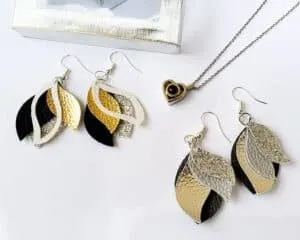
It’s so simple to DIY your own jewelry with the Cricut Explore and some key supplies. You can make custom earrings with this easy leather earring tutorial.
What Leather Tools Should I Buy?
When you’re just getting started, you need to know what leather tools to buy.
Start off with a simple set but always check the reviews before you buy them.
The good thing is that if you already own a Cricut machine, the knife blade will allow you to cut leather, wood and other thick materials really easily.
Use the blade comparison chart to find out which blade works best with your machine.
If you want to save money and save material, use these small leather sheets to make the earrings. They come in a variety of shiny metallic colors and are perfect for small projects like jewelry making.

Tutorial for Cricut Explore Air 2
For best results, use the regular blade on your Cricut.
Click “Go”. Make sure to choose two project copies so you get a pair of earrings and not just one.
Select select “mirror image” if your design is not the same on the front and the back.
Put your faux leather material on the mat face down and cut out your shapes. Turn the Smart Set Dial to “Custom” and select “Leather, Faux – 1mm (Cricut)” from the list of custom materials.
If you're using a different Cricut machine, you can use the Cricut Faux Leather: Cutting Instructions reference guide to help you find the right setting.
Now, that you've picked your setting, load your mat and click “Go”.
For the next step, use fabric glue to attach the top edge to a jump ring. Fold the top over the jump ring, add a drop of glue and press down .
Attach the jump ring to a fishhook finding. Use needle nose pliers to pull open the jump ring, attach to the earring and then close the jump ring securely.
Open the bottom loop of the fishhook finding using needlenose pliers. Thread the loop through the leather earrings.
Close the loop using your pliers.
Ta-da! You've now got yourself a pair of custom design earrings.
Tutorial for Silhouette Cameo


Don't feel like making them yourself? Grab these silver leather Matisse-inspired earrings; same beautiful look without the effort.
Have you tried making earrings with your cutting machine? How did they turn out?


20 Best Leatherworking Tools - Paper Flo Designs
Friday 21st of May 2021
[…] stores like Michaels and Hobby Lobby. It seems like everyone is into making keychains, pouches, and leather earrings. Have you thought about making some […]
Split Diamond Ring SVG Cut File - Freebie Friday - Paper Flo Designs
Tuesday 9th of March 2021
[…] DIY Cricut Faux Leather Earrings 3 Easy Ways to Add Text to an Image 10 Girls Night Out Craft Party […]
7 Best Vinyl Machines for Beginners - Paper Flo Designs
Wednesday 3rd of March 2021
[…] are some that can cut harder materials like leather and suede? If you like making jewelry, you can make faux leather earrings. You can also cut common and not so common materials like chipboard, cardstock, paper and wood. […]
Marisa
Saturday 1st of February 2020
Your supply list says “acrylic paint”. What did you use it for? I didnt SEE it mentioned.
Naa Ardua
Sunday 2nd of February 2020
The acrylic paint is optional for decorating. I have updated the post.