
Mira 7 vs Glowforge, which laser machine should you get?
Both printers have their pros and cons, but I think the Glowforge wins out on most points. Read my full review to see why!
Glowforge – what to know about it
The Glowforge is a new type of laser cutting printer that uses light instead of heat to create objects.
It’s designed for people who want to print, engrave and score things onto different materials, and it has a built-in camera to help you read the design templates, see a live preview and make your creations right away.
There are 3 different styles.


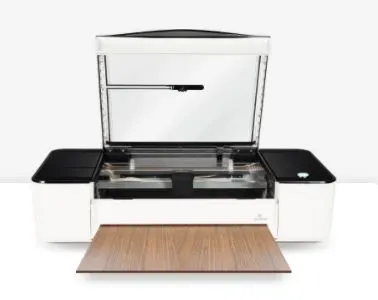


As you can imagine the basic is your starter machine, the pro is the upgraded version and the Plus is the DE-luxe of the deluxe.
But, each one is capable of printing on, engraving and cutting a wide range of materials like glass, wood, acrylic, leather, paper, thin plastic and even metal.
This makes Glowforge ideal for small businesses.

I get commissions for purchases made through some of the links in this post. There is no extra cost to you. See my full disclosure here.
Aeon Mira 7 – what to know about it
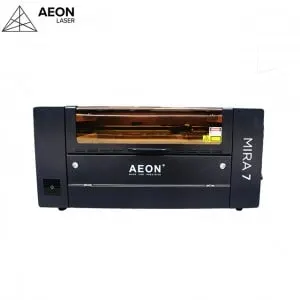
Aeon Mira 7 is a professional desktop laser engraving machine. The work area measures 700*450mm.
Some of the things that you’ll appreciate about it are the built-in water cooler, exhaust fan and air compressor pump.
This is great if you don’t have much space because it keeps everything very compact, clean and modern.
It can meet your requirements for speed, power and running time.

1. Engraving quality and speed
The Glowforge can do 3D engraving with a resolution of up to 1355 dpi (dots per inch), while the Mira only offers 100 dpi.
This means the Glowforge will produce more detailed images than the Mira.
However, the Mira produces higher quality prints because it uses less energy and creates fewer fumes due to the integrated AEON Clean Pack technology.
The Mira 7 has an engraving speed of up to 1200mm/sec. The acceleration speed is 5G.
2. Price
If you’re looking for something affordable, the Glowforge is probably the better choice. The starting cost for the Basic model is $3995, compared to $7500 for the Mira.
The price range of Glowforge laser printers is from $3995 to $6995.
Don’t panic, if don’t have that much money up front. Both engraving machines have a payment plan option.
You can also buy additional accessories like the Glowforge air assist filter in order to customize your printer.
3. Design Freedom and Community
The Glowforge machine has a lot going for it.
There is a community group forum that lets you share your designs with other Glowforge users!
It’s also a way for Glowforge owners to get feedback on their laser designs.
Second, the Glowforge comes with a ton of preloaded designs, so you can start printing right away.
Third, the Glowforge is easy to set up and operate.
The software is really easy to use and the interior camera that allows you to drag and drop and cut the pattern right where you want it, making this much easier than traditional CNC software.
Finally, you can schedule a virtual one-on-one product demo with one of the Glowforge experts to see the machine in action.
Mira also has a community aspect but it’s limited to a Facebook group. If you’re not a fan of facebook groups, then you can check out their Instagram page to see what other Mira 7 business owners have made.
Is buying and spending locally a priority for you? Then you’ll want to know that Glowforge’s headquarters are in Seattle Washington. Mira originally comes from Chinese suppliers but they also have a location in Melbourne Florida.
Customer service is available in English for both brands.
4. Hardware & Maintenance
How will each one hold up?
If you’re looking for a cutting machine that will give you the ability to make large, beautiful projects, then the Glowforge is definitely worth checking out. It’s one of the best laser cutters available.
While some may consider it to be the best option, there are some drawbacks to consider before making your purchase.
First, the Glowforge isn’t as fast as other printers. While it does produce high-quality results, it takes longer than other models to complete each job. This makes it less ideal for those who need to print multiple jobs per day.
This is mainly because you need to let your Glowforge finish the cooldown cycle before you open the lid; otherwise, the post-print photo will be incomplete.
The cooldown cycle should typically take less than a minute or two.
Also, the results from a project can be touch and go if you use non-Proofgrade material. Proofgrade materials are made by Glowforge to be used with the machine.
A wide variety of problems can crop up from material that doesn’t work well with your Glowforge.
If you run into a problem with non-Proofgrade material, try re-printing it on the extra piece of Draftboard that comes with the Glowforge (or any other Proofgrade material) to see if it still happens.
Pro Tip: Use Proof Grade materials with Glowforge
Hardware
The Glowforge is designed to last.
The case is made of high modulus injection molded plastic.
Its build quality is solid, and its materials are durable enough to withstand years of heavy use.
Dimensions: 38W x 20.75D x 8.25H
The Mira 7 case is made up of a very thick galvanized steel plate, which is very strong. It has integrated recessed LED lights on both sides that are covered so that it takes up less desk space. An optional factory stand is also available.
Machine Size: 1100mm*845mm*480mm
A machine made of metal will be more durable but when you take into account the integrated computer system, you don’t want to go around dropping either one of these.
5. Warranty
The Glowforge has a solid warranty, with a 6 to 12-month comprehensive warranty against defects depending on which of the three machines you choose.
That said, the Mira comes with a one-year warranty. But wait, it’s set up a little differently. Here is what’s covered and for how long.
For the laser tube, mirrors, and focus lenses, they offer a 6-month warranty claim. For the RECI laser tube, that’s covered for 12 months.
Lastly, for the guide rails, they offer 2 years of warranty.
Should you get a CNC Router or a Glowforge?
Well, you’ll be surprised to hear that you can use them together.
Technically speaking, Glowforge is a CNC laser cutter engraver, but it’s more often referred to as a 3D laser printer
The Glowforge laser cutter and CNC router seem similar in what they can do, but the things that you can do with them are actually different.
Glowforge is great for thinner materials, generally less than 1/4 inch.
While the CNC is better at cutting thicknesses of around 1/4 inch to 3/4 inches. You can also find some that cut up to 2 inches depending on the bit.
Here are some of the materials that each machine can cut.
Glowforge
Cuts & Engraves
- wood
- fabric
- leather
- paper
- cardboard
- plexiglass (acrylic)
- Delrin (acetal)
- mylar
- rubber
- cork
- sandpaper
- foods
CNC Router
- polycarb
- thick aluminum
Glowforge is great for tight corners, while the CNC is great for removing large sections of material.
The CNC also lets you play around with the dimensions so that you can get various depths.
Let’s say that you want to make magnets out of wood. You can use the Glowforge to etch the interior edges of the wood where you’ll set the magnet. Then use the CNC router to cut the magnet and place it into the etched groove.
Watch this video to see how to use the Mira 7
Facts and Common Questions
It can cut and engrave wood, leather, aluminum, acrylic, and more.
A Mira 7 laser engraver costs $7500
When you upgrade to the Glowforge Pro you get solid state thermoelectric cooling.
The Pro model also has a passthrough slot that gives you the ability to use material that’s up to 1/4″ (6.3mm) high, up to 20” (50.8cm) wide, and of any length.
This is helpful if you need to engrave a long and large item.
The cutting thickness on a Mira 7 is between 0-10mm. This will depend on the type of material you use.
Conclusion
So, with all the cool features of the Glowforge and the integrated options of the Mira Series, which of these engraving machines do you think is the best?
Want to save this for later? Pin it to your favorite DIY board on Pinterest!
No time to read the whole post now? Feel free to save this to your craft board on Pinterest so you can come back to it later.
More creative craft ideas!
If you loved this list of ideas, I hope you will try my other easy DIY craft ideas like how to make easy t-shirts with these supplies.
