
If you’re looking to create sublimation prints, you’ll need a special type of printer – a dye sublimation printer. These printers use sublimation ink that turns into a gas when heated, transferring the design onto the material.
This process results in high-quality prints that are durable and long-lasting.
But what printer do you need for sublimation? In this post, I’ll share the 10 best printers for sublimation and some buying tips to help you choose the right one for your needs.
Don’t have time read the whole post? Here is my list of the top 3 sublimation printers


I get commissions for purchases made through some of the links in this post. There is no extra cost to you. See my full disclosure here.
1. Epson SureColor PRO F570
The Epson SureColor PRO F570 offers a wide format printer option that can handle various materials and print sizes. It has a built-in cutter, and it comes with a software bundle for editing and printing. This printer is great for small business owners looking to create large quantities of sublimation prints.


2. Sawgrass SG1000
The SG1000 is an ideal printer for growing businesses, offering pro-level print consistency and versatile dimensions. It prints up to 11″ x 17″ with the standard tray and is compatible with SG800 accessories for larger media sizes. The printer features energy-efficiency, higher resolution, WiFi connectivity, and a 2-year warranty with unlimited tech support. It is perfect for producing high-volume small products or larger personalized items.


3. Epson EcoTank ET-4850
The Epson EcoTank ET-4850 is an affordable option that uses refillable ink tanks instead of cartridges. This printer model allows for easy refilling, and it also has a high-capacity paper tray. This printer is ideal for home use and small business owners with moderate print jobs.

4. Brother MFC-J995DW
The Brother MFC-J995DW is a multifunctional printer that can handle sublimation printing. It uses standard inkjet printer technology with dye-sublimation ink to produce vibrant colors. This printer model is a good choice for those who want a printer that can also handle regular print jobs.

5. Epson Artisan 1430
The Epson Artisan 1430 is an excellent option for creating sublimation prints on various materials, including coffee mugs and polyester fabrics. With six ink cartridges, this printer produces high-quality prints with vibrant colors. This printer model is great for small business owners looking to expand their product offerings.

6. Epson Stylus C88+ Inkjet Printer
The Epson Stylus C88+ is a popular choice for sublimation printing. It’s an affordable printer that can produce high-quality prints on various sublimation blanks. It uses standard inkjet technology with dye-sublimation ink, and it’s easy to set up and use.

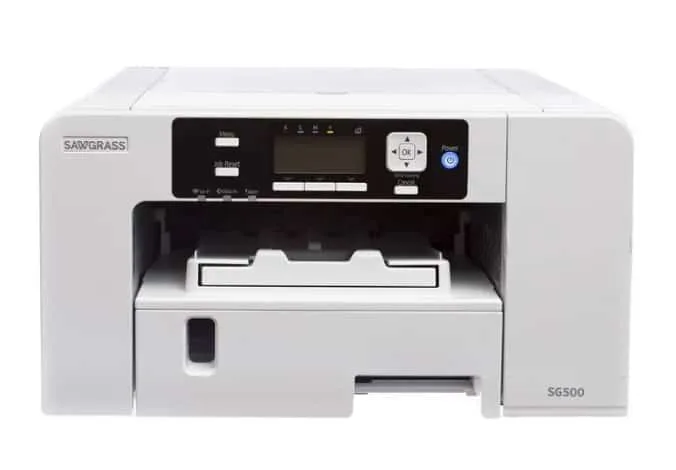
7. Sawgrass Virtuoso SG500
The Sawgrass Virtuoso SG500 is a specialized printer designed for sublimation transfers. It uses special transfer paper and dye-sublimation ink cartridges to produce high-quality prints. This printer model has a compact size that’s perfect for home use and small business owners.

8. WorkForce WF-7210 Wireless
The WorkForce WF-7210 Wireless is a wide format printer that uses special sublimation paper and dye-sublimation ink cartridges to produce high-quality sublimation prints. It has a high-capacity paper tray and printing speeds up to 18 pages per minute. This printer model is great for small business owners creating soft signage and other large format prints.

9. The HiTi P525L
The HiTi P525L is a compact and portable printer designed for event photographers and small business owners. It uses dye-sublimation ink to produce high-quality prints in less time than other printer models. This printer is ideal for those who need to print on-the-go.

10. HP Office-Jet 9025
The HP Office-Jet 9025 is a multifunctional printer that can handle sublimation transfers with the right ink and paper combination. It’s a good option for those who need a printer that can also handle standard print jobs.

Buying Tips
When choosing a sublimation printer, here are some tips to keep in mind:
- Consider your printing needs: What type of printer do you need, and what print size and materials will you be using?
- Look for printer manufacturers with experience in sublimation printing, like Epson and Sawgrass.
- Check for ICC profiles: These help you achieve the best results for your printer and type of ink.
- Consider the type of ink: Some printers use special inks, while others use regular inkjet ink with dye-sublimation ink.
- Check for a good quality printer head: This is essential for consistent and high-quality prints.
- Look for printers with affordable price and print speed that fits your needs
Conclusion
The best printer for sublimation depends on your needs and what you plan on printing. Some of the best options include Epson SureColor PRO F570, Sawgrass Virtuoso SG1000, and Brother MFC-J995DW.
Be sure to consider the type of printer, print size, type of ink, and quality of the printer head when making your decision.
With the right printer and special transfer paper, you can create high-quality sublimation prints that will bring your designs to life.
Need more tips? Find out how to fix sublimation tumbler mistakes in just a few steps.


