
If you’re looking for the best software tools to create custom stickers, well, you’ve come to the right place!
Are you tired of boring, plain stickers? Do you want to add a little bit of pizzazz to your planner or start your own sticker business?
In this article, I’ve rounded up 7 of the best sticker design software programs, both free and paid, for makers.
These programs are perfect for creating custom stickers for planners, bullet journals, or even starting your own sticker business.
So, get ready to stick around and discover the best tools to become a sticker-making pro!
No time to read the whole post? Here are my top 3 favorites


I get commissions for purchases made through some of the links in this post. There is no extra cost to you. See my full disclosure here.
1. Cricut Design Space
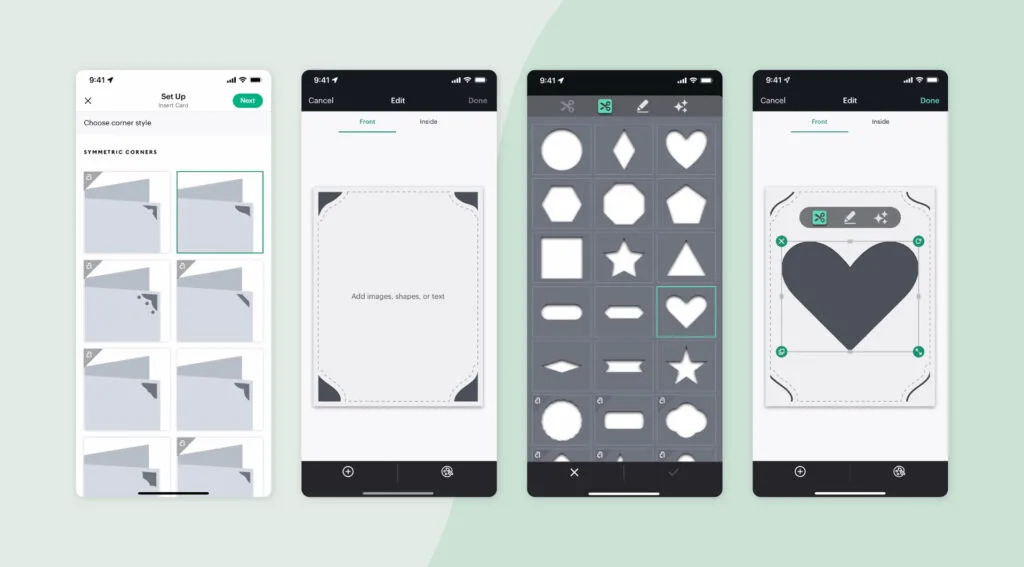
Cricut Design Space is a software program from Cricut that allows you to upload your own designs or use pre-made templates and graphics from Cricut Access. While Design Space is free to use, there is a monthly subscription fee for Cricut Access.
You can save money by paying once a year if you subscribe to the annual option. Cricut machines are great for making custom stickers and other types of vinyl decals.

2. Affinity Designer
Affinity Designer is a great hybrid drawing program that has vector and raster capabilities. You only have to pay one time for it, meaning that there is no monthly fee to use it.
It offers a variety of shapes and tools for creating professional-looking labels, stickers, and other designs. Take a look at the bunny drawing that I made using Affinity in the video pin below.
3. Canva
Canva is a popular design software that is accessible online and offers both free and paid versions. It has a variety of templates and graphic designs that you can use to create your own stickers, as well as other designs like business cards and social media graphics. I have Canva Pro and I use it every single day. It’s that good!


4. Adobe Photoshop
Adobe Photoshop is another paid software in the Adobe suite of graphic editing programs. It offers powerful features for editing raster images and creating custom labels, stickers, and other designs. It’s a great option for professional designers who need advanced tools for their design process.
5. Inkscape
Inkscape is a free and open-source vector graphic software that can be used on a PC or a Mac. It offers a variety of shapes and tools for creating custom labels and unique die-cut stickers. It’s a great option for entry-level designers who are just starting out.
But it’s not only for beginners, professionals also use Inkscape. It also happens to be one of my favorite graphic design programs. But I have to admit that it has a steep learning curve. That’s also why I created a shortcuts guide to use Inkscape.


6. Procreate
Procreate is a budget-friendly option that has a one-time fee. It’s a raster image program that you can download to your iPad, making it a convenient option for designers on the go. It offers a variety of tools for creating custom labels and stickers.
7. Adobe Illustrator
Adobe Illustrator is a paid program used by professional designers. It offers a wide variety of advanced features for creating professional-looking labels, graphics, and digital stickers (yup, for digital planners….they are really trending!). If you’re willing to invest in a powerful graphic design software, Adobe Illustrator is a great option.
Conclusion
Whether you’re a small business owner or a hobbyist, these software programs offer the best options for designing and printing your own stickers and labels.
Many of them also offer a free trial or a free version, making it easy to find the best option for your needs.
With the right software and tools, you don’t have to be a graphic designer to create professional-looking product labels and stickers. So, have you tried any of them? Let me know which one is your favorite.


Frequently Asked Questions
Can I use Canva to design stickers?
Yes, you can use Canva to design stickers. Canva offers a variety of customizable stickers in different shapes and sizes that you can use to create your own designs.
Is it legal to sell stickers from Canva?
Yes, it is legal to sell stickers made with Canva, as long as you have the appropriate licenses for any images or graphics used in your designs. Canva also offers a variety of free and paid templates that you can use as a starting point for your sticker designs.
Can you make stickers on Canva and sell on Etsy?
Yes, you can make stickers on Canva and sell them on Etsy. Etsy is a popular ecommerce platform for selling handmade and unique products, including custom stickers. However, make sure to check Etsy’s guidelines and policies for selling on their platform.
What software is used to design labels?
There are many software programs that can be used to design labels, including Adobe Illustrator, Canva, Inkscape, Affinity Designer, and Maestro Label Designer.
Do professionals use Adobe?
Yes, many professional graphic designers use Adobe software, including Adobe Illustrator and Adobe Photoshop, for their design projects.
Is there an app to design stickers?
Yes, there are several apps available for designing stickers, including Adobe Spark, Sticker Maker, and XYRON Create. These apps offer a variety of tools and features for creating custom stickers on your mobile device.
Is making stickers a good business?
Yes, making stickers can be a profitable business, especially if you have a unique design style and a good marketing strategy. Many small businesses and hobbyists have found success in selling custom stickers on ecommerce platforms like Etsy or in their own online store.


