
Here’s How to Get Cricut to Stop Charging You to Cut
So, you’ve got a subscription to Cricut Access and you’re wondering why you’re being charged to cut your design? No worries, we’ll get to the bottom of this together. Let’s dive into some questions you might have.


I get commissions for purchases made through some of the links in this post. There is no extra cost to you. See my full disclosure here.
Why is Cricut charging me to cut my design?
Cricut Access gives you access to a vast library of images, fonts, and projects. However, there might be some premium content or licensed content that isn’t included in your subscription. If you’re being charged, it’s likely that you’re using a design or font that isn’t covered by your Cricut Access subscription.
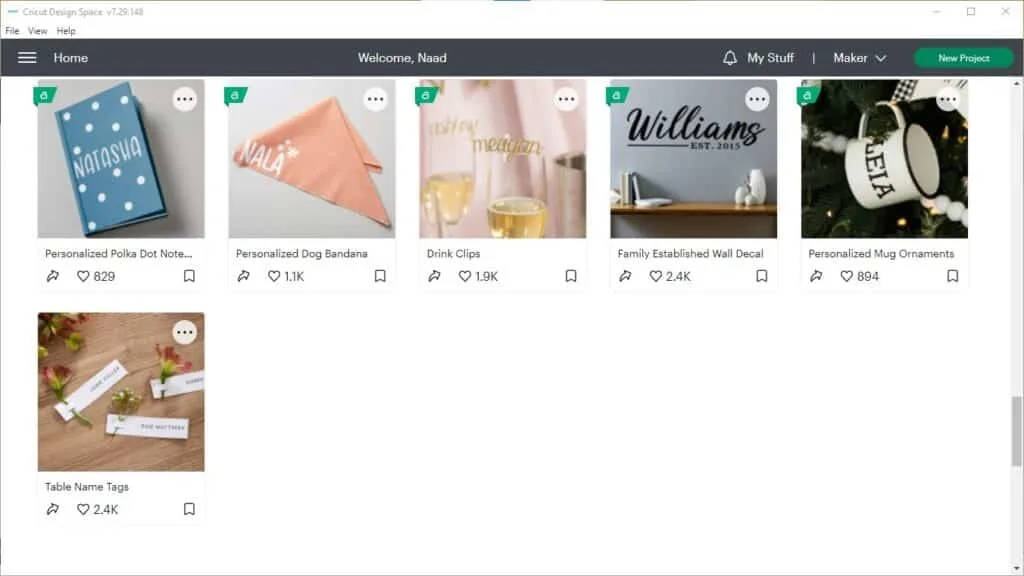
You can see the designs that are included in the Cricut Access subscription are earmarked with a little green tab and the letter “a” on it.

If you’re absolutely sure that you’ve already paid for Cricut Access try clearing your cache. It could just be a glitch. If you clear the cache and you’re still getting the same error, then try rebooting Design Space.
Do you have to pay to cut on Cricut?
No, you don’t have to pay to cut on Cricut. You can create your own designs or use the free designs available on the platform. However, if you’re using premium content or licensed designs, you may need to pay a fee to use them.
Cricut tends to rotate its collection of free fonts and designs. So, if you find a free design and start using it, then a few days later you go back to finish, you may find that the same design now has a price attached to it.
The same thing could happen if you start on one device and then switch to another. For example let’s say that you grab a design from the app, then switch over to your computer to have more room to create your project.
Well, you may find that the price of the design or font could be different in the Cricut Access app from the price you see on your computer.
Buying Designs in the Cricut App
The same thing could happen if you start on one device, then switch to another. For example, let’s say that you grab a design from the app and then switch over to your computer to have more room to create your project.
Maybe you paid for it in the app already. So why the heck is Design Space trying to charge you for it again on your computer?
Well, when you buy a design in the app, this means that it’s going through your iTunes or Google Play account, just like other in-app purchases.
It might take a short while for your account to update. So give it a few minutes for the design to show up when you’re transferring to another device.
If you’re only working in the app and you still don’t see the design, try signing out of the app and then signing back in to refresh your account.
This should make your images and fonts available without any additional charges.
When did Cricut start charging?
Cricut has always had a mix of free and paid content on its platform. It’s essential to be mindful of the designs you’re using, as some may come with an additional cost.
If you want to use the baby name tag in the photo below, you can see that the design costs 99 cents.

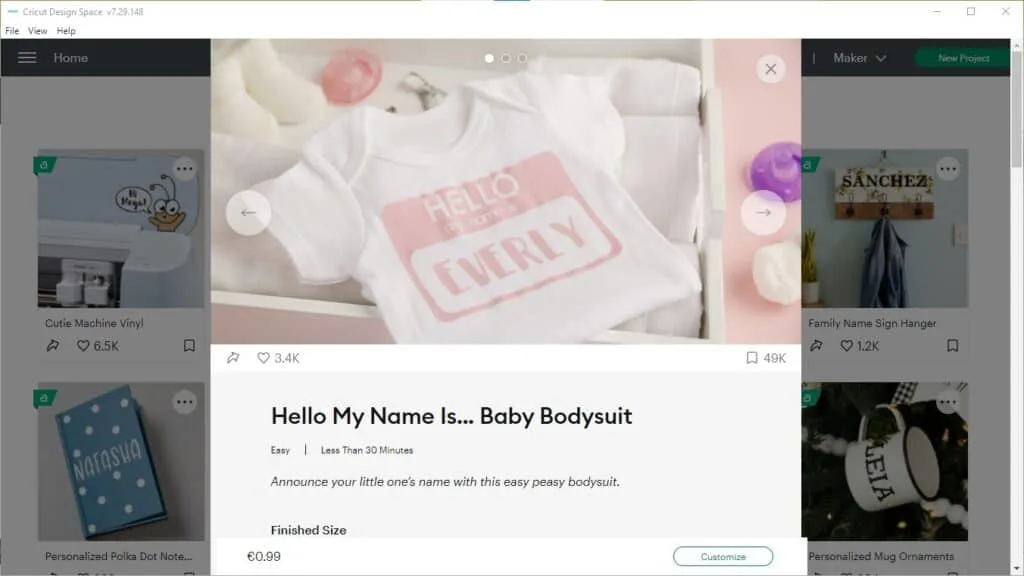
Once you click customize to cut the design, you’ll eventually get a checkout screen asking you to buy the design if you don’t have Cricut Acces.


You can try a free 30 day trial of Cricut Access to get the design without paying for it.
To avoid surprise charges, double-check the cost before you begin cutting.

How do I use Cricut for free?
To use Cricut for free, stick to the free content available on the platform or create your own designs. There are plenty of free images, fonts, and projects you can use. By avoiding premium and licensed content, you can continue enjoying Cricut without any extra fees.
Is anything free on Cricut?
Absolutely! Cricut offers a wide range of free images, fonts, and projects for you to use. Just make sure you’re only using the free content and not accidentally selecting any premium or licensed designs to avoid additional charges.
Can I use my Cricut without the app?
Yes, you can use your Cricut without the app. Cricut Design Space is available on your computer as a desktop application, and you can use it to create and cut your projects. This gives you the flexibility to work on your designs from various devices.
Conclusion
To wrap things up, while Cricut Access provides access to a vast library of content, it’s essential to remember that not all designs are included in the subscription.
- Double-check to see if you’re using premium or licensed designs to avoid surprise charges.
- Go through the tips above to fix any issues with getting charged to cut your designs.
There’s plenty of free content available, you just need to take the time to find it. If you don’t have time to go digging for fee designs then get Cricut Access. Don’t forget that you can also make your own designs and upload them to Design Space.


Frequently Asked Questions
Q1: Why is Cricut charging me for cutting?
A1: Cricut charges for cutting if you’ve exceeded the free usage limit in Cricut Design Space. To stop the charges, you need to manage your usage and consider a Cricut Access subscription or pay-per-project pricing.
Q2: How can I monitor my Cricut cutting usage?
A2: You can monitor your Cricut cutting usage by logging into your Cricut Design Space account. Your usage details, including the number of projects and materials used, can be found in your account settings.
Q3: What is Cricut Access, and how does it work?
A3: Cricut Access is a subscription service that provides access to a library of Cricut images and fonts, along with discounts on materials and machines. Subscribing to Cricut Access can be a cost-effective way to use your Cricut without incurring extra cutting charges.
Q4: Can I use Cricut without a subscription or extra charges?
A4: Yes, you can use Cricut without a subscription by monitoring your usage and staying within the free limits. You can also opt for pay-per-project pricing if you prefer not to subscribe to Cricut Access. Managing your usage and choosing the right pricing plan can help you avoid extra charges.
Q5: Where can I find more information on Cricut pricing and subscriptions?
A5: You can find detailed information on Cricut pricing and subscription options on the official Cricut website. They provide comprehensive details about Cricut Access, materials, and other pricing-related information.

Kathy
Wednesday 23rd of August 2023
I wish I had never bought the circuit machine . I should have stayed with the pallet . It cost money for everything unless you get caught in their yearly rate.
Naa Ardua
Thursday 24th of August 2023
I understand, Kathy. Sometimes, it's hard to pick a machine if you don't know about these costs before you buy. Hang in there, I hope you still find ways to make stuff with your Cricut machine without breaking the bank.