
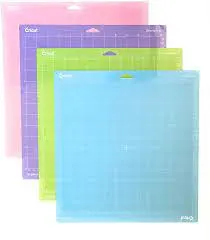
You love your faithful Cricut mat. It’s a vital part of making almost every one of your craft projects. But like everything else, these mats don’t last forever.
They wear out over time, lose their stickiness, get dirty, and may even develop cuts or grooves that can affect their performance.

I get commissions for purchases made through some of the links in this post. There is no extra cost to you. See my full disclosure here.
So, how do you know when it’s time to replace your Cricut mat? Here are the tell-tale signs:
- Adhesive Amnesty: Is your mat struggling to hold materials firmly? Is the material slipping and sliding during cutting? If so, it may be time for a fresh mat.
- Tough Take-offs: Are you finding it hard to peel your cut material from the mat without damaging it? This could signal that your mat is past its prime.
- Damaged Goods: Spot any deep cuts, grooves, or excessive wear on your mat’s surface? It might be a good idea to start browsing for a new one.
- Cleaning Challenges: If cleaning has become a herculean task and the stickiness just won’t return post-cleaning, it’s probably time to switch mats.

“So, Can I Schedule My Cricut Mat Replacements?”
Unfortunately, there’s currently no way to program your Cricut machine to tap you on the shoulder when it’s time for a new mat.
It would require a level of tech integration with the Cricut machine’s software and hardware that isn’t currently available.
But who’s to say that the future isn’t bright?
With the fast pace of AI developments, maybe there will soon be a way to access the Cricut Design Space API and let you know the exact date and time for replacement.
Sort of like how your trusty inkjet printer lets you know when it’s time for new ink.
How amazing would that be?
Wrapping Up
Remember, a well-maintained Cricut mat is a cornerstone for the perfect cut. Be on the lookout for the signs that it’s time to replace your mat so that it’ll be ready for your next project.
FAQ Section
Cleaning your mat after each use can extend its lifespan. It removes tiny bits of material that might affect future cuts.
This usually happens when the blade pressure is set too high or the blade is too deep. Make sure to adjust these settings based on the material you’re cutting.
You can cut on Cricut without a mat but the mat helps keep your material steady during cutting. Cutting without a mat may lead to imprecise cuts or potential damage to the machine.
While it’s best to use Cricut-branded mats, in a pinch you can use other similar cutting mats from other brands, provided they fit your Cricut machine.
