
DIY crafting has gone from average to amazing ever since Glowforge machines came onto the scene.
The Glowforge is a revolutionary new device that lets you print 3D objects directly onto any surface using heat and light. They offer 3 styles of laser cutting machines that fit a variety of skill levels from the beginner to pro.
These are:
- Glowforge Basic
- Glowforge Pro
- Glowforge Plus
Each one allows you to make a custom design project using various materials. With this one laser printer, you can engrave wood, cut acrylic, leather, paper and so much more.
The final product rivals any professionally made item that you can find in a craft store or the aisle of your favorite big box store.
With all that Glowgforge has going for it, you can understand why it’s become the gold standard.
But it’s also expensive at $4000, which makes it out of reach for many people.
No time to read the whole post? Here are my top 3 choices
Glowforge Competitors
So what if I told you there was another way to make beautiful 3D printed designs without spending thousands of dollars? Well, there is. In fact, there are alternative machines that you’ve probably never heard of.
There are several different kinds of laser cutting machines available today. You can buy them online or at local retailers. One of the most popular models is the Thunder Laser Nova.
But it’s not the only player in the game.
Many of its competitors see just how popular it has become and they are now offering other options that can do just as much if not more.
In this post, I’ll cover the best glowforge alternatives. I’ll break down the ease of use of each laser cutter, the price range, and the safety features.


I get commissions for purchases made through some of the links in this post. There is no extra cost to you. See my full disclosure here.
What lasers are similar to Glowforge?
The following laser cutting machines are similar to Glowforge.
1. xTool S1
xTool S1 is a diode DIY laser engraving and cutting machine. It’s just as good or better than Glowforge because for the same price, you can also get the S1 Air Assist Set.
Unlike the glowforge air filter in which the main purpose is to clean the air, this accessory provides a steady and high-pressure flow of air to blow away the smoke and keep your work area clean. This is important because the heat from the smoke can deteriorate the workpiece by turning it yellow.
The xTool S1 is a game-changer in the world of laser engraving. With first-class laser safety certification and an enclosed design, it offers four-tier safety protection.
The machine boasts up to 40W high power and stable performance at 600mm/s. Its revolutionary tech includes twin-point positioning for camera-like precision and a full-scene autofocus system.
This makes it easy to see the image that you want to engrave.
It’s a newer machine so, you may not find as many tutorials on how to use it just yet. Nevertheless, it’s made with beginners in mind, so the learning curve is pretty small.


Here are some of the other features of the xTool
- 18mm Wood Cuts in one pass by a 40W high-power laser
- Higher Accuracy and Stability by Durable Mechanical Structure
- Large Working Space: 19.61 x 12.56 inches working area and 5.25 inches working height with the riser base.
- Compatible with xTool Creative Space, LightBurn, and 3-way connection(USB, WIFI, TF card)
- Supporting 100+ materials: Wood, Metal, Acrylic, Glass, Leather, etc.
2. xTool P2 Laser Engraver
Look no further than the xTool P2 for an alternative to Glowforge. It’s probably the closest in all aspects
It’s easy to install and ready to use right out of the box. You can cut and engrave the same materials that you can with Glowforge.
- wood
- leather
- fabric
- glass
- metal
- food
- rubber
- acrylic
There is even an AI camera to give close detail and detect different craft blanks. Meaning that you can engrave different projects at the same time.


3. ATOMSTACK A5
A very complete and well-thought-out package. It’s easy to assemble and you’ll be able to use it very quickly. Make sure you read everything and research how to properly use a diode laser.
Pros: LaserGRBL is simple enough to figure out and it accepts a large variety of images, from svg to jpg.
Cons: There is a lot of terminology to learn.


4. LaserPecker 2
Laserpecker 2 is a good cheap laser engraver. It’s among the best of the low-power laser machines and one of the best choices if you don’t have much money to spend on a machine. Don’t be fooled by the price tag. In this case, cheap doesn’t mean low quality.
⛏️ What can you engrave with LaserPecker?
The LaserPecker 2 can engrave the following items
- Plastics
- Timber
- Glass
The LaserPecker app lets you engrave pictures onto common materials like cups, glasses, bags, cutting boards, and more. It’s free just like the Glowforge app.
You can use other software like Adobe Illustrator to edit photo or digital files before uploading them to the app. Once you upload the photo to the app, you can engrave it in 4 easy steps.
Step 1: Choose an image from the app
Step 2: Edit your image
Step 3: Select engrave
Step 4: The engraving process will start automatically


5. OMTech 55W
Price Point
The OMTech 55W offers numerous advantages in comparison to the Glowforge. For starters, the price point is lower, making it more affordable.
Cutting thickness
You can cut thicker materials with this machine. The maximum cutting thickness is 0.63” whereas the maximum for the Glowforge is 0.25″.
Pros: The lower cost means that you’ll have money saved for other supplies
Cons: Does not include LightBurn Software


6. Muse 3D laser cutter
The 3D camera features set the FSL Muse 3D Autofocus Desktop CO2 Laser Cutter machine apart from the rest. You’ll be impressed by the RetinaEngrave v3.0 laser control and design software. The integrated software means that you don’t need an internet connection to use the laser machine. And you’ll be happy to know that it’s compatible with Google Chrome, Safari, Edge, and Firefox
Muse laser cutter features:
- autofocus
- LCD touchscreen functions
- self-hosted browser based software
Pros: no internet required
Cons: Rotary attachment is not included – (you’ll have to buy this separately if you want to engrave cups)


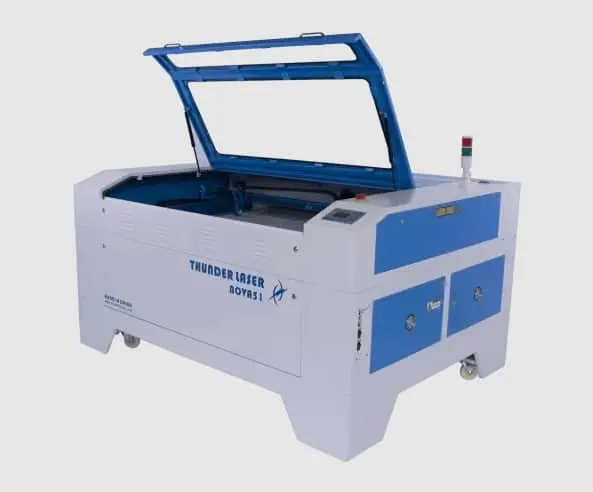
7. Thunder Laser Nova 51
Best customer service
Thunder Laser Nova is not only Glowforge’s competitor when it comes to performance but also when it comes to support.
This co2 laser engraving system is known for its outstanding customer service. When you’re spending that kind of money on a machine you want the peace and comfort that comes with knowing that someone reliable and competent is always on hand to help you out in case of any questions or hiccups.
Pros: Highly rated customer service
Cons: Lesser known

8. Dremel Digilab LC40
⚙️Who makes the Dremel laser cutter?
The Dremel company is the original and official maker of the Dremel laser cutter. They’ve been developing machines for over 85 years.
The most popular is the Digilab LC40. It features a simple printing process: place the material, select its settings, and print. It comes with easy-to-use software and is perfect for cutting, scoring, and engraving a variety of hard and soft materials.
Here are a few of the materials that you can use with it:
- wood
- glass
- stone
- paper
- fabric
- leather
This product is discontinued by the manufacturer. But Dremel recommends the Glowforge Pro for similar product features and price range.
Pros: features a cooling and air assist system
Cons: discontinued


9. 90W RECI CO2 Laser Engraver and Cutter
Just like with Glowforge, here is what can you cut and engrave with the 90W RECI CO2:
- Wood
- Paper
- Cloth
- Acrylic
Benefits of the machine
- Specialized design concept, tailored to users in different industries, reasonable structure, beautiful appearance and practicality.
- The profile cast by the high-precision mold has a high strength, high stability mechanical structure, stable numerical control movement, high speed, high precision. The design concept of front-to-back penetration of the machine body can facilitate front-to-back feeding, and is suitable for processing unlimited length workpieces.
- Advanced industrial cooling system and automatic protection function without water alarm have improved the stability and safety of continuous work. Perfect dustproof and anti-pollution design greatly improves the stability of the whole machine.
- It adopts flight light path design, with unique structure, small light path deviation, high stability and convenient adjustment. Optical fittings use the highest quality imported mirrors and focusing mirrors, with the highest reflectivity and transmittance among similar fittings, thinner facula and stronger cutting force.
Pros: Cutting and engraving functions are very good.
Cons: Can be hard to find because it’s often out of stock.


10. ORTUR Laser Master 3 Laser Engraver
Wide Compatibility
Ortur laser master 3 laser engraver can be compatible with various mature engraving software, such as LaserGRBL, LightBurn, support Win XP / Win 7 / Win 8 / Win 10, and also support MAc and Linux system (LightBurn, need the paid version).
Engraving file format supports
- JPG
- PNG
- BMP
- JPEG
- SVG (vector graphics)
Pros: The laser can use Lightburn which is amazing.
Cons: You’ll need to buy additional rollers if you want to engrave cups or cylindrical items.


11. Beamo
🤔 Is Beamo as good as Glowforge?
Beamo is a small desktop CO2 laser cutter and engraver. It features a powerful 30-watt CO2 laser that can cut and engrave on organic materials and even engrave select metal.
It has a revolutionary design and intuitive user interface.
Anything that you can cut and engrave on Glowforge can also be done with Beamo.
Pros: Small and compact
Automatically pauses if the lid is opened while in use
Cons: Only works with in-house developed software


Want to save this for later? Pin it to your favorite DIY board on Pinterest!
Don’t want to forget all these great tips? Save this post to your Pinterest account for later.
Pick the Right Machine for You!
There are lots of machines that you can use to make your own 3D printed objects at home. You can use a laser cutter, CNC machine, or even a 3D printer.
Thankfully, Glowforge has come up with the all-in-one crafting machine that you have always dreamed of.
Stay-at-home moms are sprouting small businesses almost overnight, thanks to what many would call the best laser cutter in the industry.
But really, the best laser machine is the one that fits your needs.
If you’re looking for a good alternative to a Glowforge for your personal use or for business use, you have options.
So, now that you understand the main difference between the Glowforge laser cutter and the alternative laser printing machines, which one will you pick?
More creative craft ideas!
If you loved this list of ideas, I hope you will try my other easy DIY craft ideas! 20 easy Glowforge project ideas, How to make cut files for Glowgorge, profitable DIY crafts
