
Are you looking for the best Cricut machine to create fantastic t-shirts for any special event or occasion?
You’ve come to the right place! In this post, we’ll compare 5 of the latest Cricut machines and highlight their pros and cons to help you find the right one for making t-shirts. I also add one surprise machine that I think you should check out.
I’ll also cover common questions about Cricut like whether you can make your own designs, if you can use svg files that you buy outside of Cricut Access, and basic tips to make your own custom t-shirts.
No time to read the whole post? Here are my top 2 picks

I get commissions for purchases made through some of the links in this post. There is no extra cost to you. See my full disclosure here.
Is Cricut good for T-shirt making?
Absolutely! Cricut machines are excellent for creating custom t-shirts, thanks to their precision cutting and ability to work with various materials like heat transfer vinyl and iron-on vinyl.
With Cricut Design space and a good cutting machine, you can create unique, professional-looking shirts from different materials for any occasion, from birthdays and holidays to promotional events and team uniforms.
You can choose to make your own designs, get them from Cricut Access, or buy them from other online shops and marketplaces like Etsy or Design Bundles.
Is Cricut permanent vinyl good for T-shirts?
Cricut permanent vinyl is not recommended for t-shirts because it’s not designed to be flexible and soft like heat transfer or iron-on vinyl.
Instead, it’s perfect for vinyl decals on flat surfaces like mugs, car windows, and home décor items. For t-shirts, stick to heat transfer or iron-on vinyl for the best results.
Is Cricut everyday iron-on for shirts?
Yes, Cricut Everyday Iron-On is designed specifically for shirts and other fabric items. It’s a versatile material that can be used on a wide range of fabrics, including cotton, polyester, and blends.
With proper care (cold water wash and tumble dry low), your iron-on designs will last a long time.
Which Cricut is best for fabric?
The Cricut Maker series is the best option for working with fabric, as it’s designed to handle a wider range of materials, including fabric, thanks to its Adaptive Tool System and rotary blade.
It can cut through fabric without the need for a backing material or stabilizer, making it perfect for sewing and quilting projects.
Which Cricut is best for vinyl decals and t-shirts?
Both the Cricut Explore series and the Cricut Maker series are excellent for vinyl decals and t-shirts. The Explore series is a more affordable option, while the Maker series offers advanced cutting capabilities and a wider range of compatible tools and materials.
Can Cricut vinyl be ironed on?
Cricut has a specific line of vinyl called Iron-On or Heat Transfer Vinyl (HTV), which is designed to be applied to fabric using heat.
Do not attempt to iron on regular adhesive vinyl, as it’s not designed for fabric application and may not adhere properly.
Now, let’s dive into our top 6 Cricut machine picks for making t-shirts:
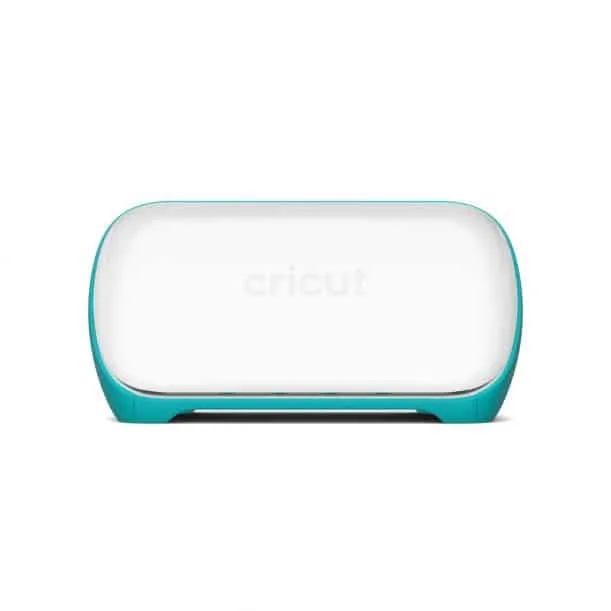
1. Cricut Joy (Good Option for Small Projects)
The Cricut Joy is a little machine that’s perfect for a newbie Cricut crafter thanks to its smaller size. You can easily crank out quick little projects. It’s also great for beginners, thanks to its ease of use and Bluetooth connectivity. However, its limited cutting width (5.5 inches) and fewer features than other Cricut models make it less suitable for large projects or heavy materials.
Pros:
- Compact and portable
- Easy to use for beginners
- Ideal for small projects and quick tasks
- Bluetooth connectivity
Cons:
- Limited cutting width (5.5 inches)
- Not suitable for large projects or heavy materials
- Fewer features than other Cricut models

2. Cricut Explore Air 2
The Cricut Explore Air 2 is a versatile machine that offers a faster cutting and writing speed compared to the Cricut Explore Air. It’s compatible with a wide range of materials, has Bluetooth connectivity, and can cut, write, and score with ease. On the downside, it’s larger and less portable than the Cricut Joy and not as advanced as the Cricut Maker series.
Pros:
- Faster cutting and writing speed than the Cricut Explore Air
- Compatible with a wide range of materials
- Bluetooth connectivity
- Versatile with the ability to cut, write, and score
Cons:
- Larger and less portable than the Cricut Joy
- Not as advanced as the Cricut Maker series


3. Cricut Explore 3
The Cricut Explore 3 is a fantastic option for those who want to work with smart materials and enjoy matless cutting. It boasts a faster cutting speed compared to the Explore Air 2 and can cut, write, and score on various materials. Like the Explore Air 2, it’s not as advanced as the Cricut Maker series and is less portable than the Joy.
Pros:
- Smart Material compatibility for matless cutting
- Faster cutting speed compared to the Explore Air 2
- Versatile with the ability to cut, write, and score
- Bluetooth connectivity
Cons:
- Not as advanced as the Cricut Maker series
- Larger and less portable than the Cricut Joy


4. Cricut Maker (Best for Fabric)
The Cricut Maker is the top pick for those who need advanced cutting capabilities, thanks to its Adaptive Tool System. It can handle a wide variety of materials, including fabric, leather, and thicker materials. However, it’s more expensive than other Cricut models and not as portable as the Cricut Joy.
Pros:
- Advanced cutting capabilities with the Adaptive Tool System
- Can handle a wide variety of materials, including fabric and leather
- Compatible with a broader range of tools and accessories than other models
- Bluetooth connectivity
Cons:
- More expensive than other Cricut models
- Larger and less portable than the Cricut Joy
5. Cricut Maker 3
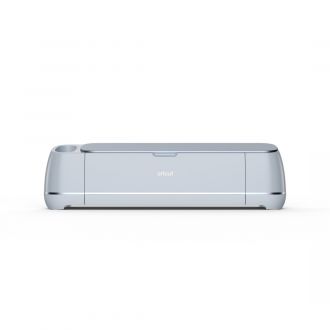
The Cricut Maker 3 offers a faster cutting speed compared to the original Cricut Maker, making it a great choice for those who want an upgrade. It also has smart material compatibility, which means that you can use it with or without a cutting mat and it can handle a wide variety of materials, including fabric and leather. Like the original Maker, it’s more expensive than other Cricut models (including other Cricut Maker machines) and less portable than the Cricut Joy.
Pros:
- Faster cutting speed compared to the original Cricut Maker
- Smart Material compatibility for matless cutting
- Advanced cutting capabilities with the Adaptive Tool System
- Can handle a wide variety of materials, including fabric and leather
- Bluetooth connectivity
Cons:
- More expensive than other Cricut models
- Larger and less portable than the Cricut Joy
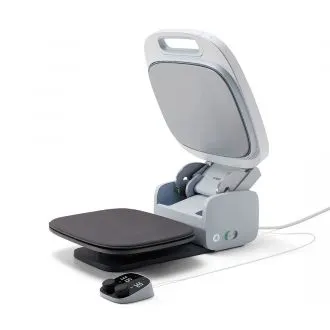
Bonus – Cricut EasyPress 2
While not a cutting machine, the Cricut EasyPress 2 is a must-have for heat transfer projects. It provides even heat distribution and adjustable temperature settings for high-quality transfers. However, it may require additional accessories for certain projects, such as a heat-resistant mat.
Pros:
- Even heat distribution for consistent results
- Adjustable temperature settings
- Various sizes available to accommodate different projects
- Easy to use
Cons:
- Not a cutting machine; only used for heat transfer projects
- May require additional accessories for certain projects (e.g., heat-resistant mat)

What Else do you Need to Make a Shirt with Cricut?
Once you’ve decided which is the best cutting machine for you, you’ll also need some other supplies to start making your own custom t shirts. Here is my list of 10 essential supplies for printing t-shirts at home.
- Blank t-shirts
- Graphic fonts
- knife blade
- Computer and/or Graphic tablet *(check for compatibility)
- Cricut cutting mats
- Vinyl sheets
- Weeding tool
- Iron or heat press
- VLR Solvent or Awesome Spray
- Paper for making t-shirts
Check out the video below to see these supplies and what you need them for.
Conclusion
Remember that choosing the right Cricut machine for making shirts depends on your specific needs and budget.
The Cricut Joy is perfect for small projects and beginners, while the Explore series offers versatility and smart material compatibility.
For advanced cutting capabilities, the Cricut Maker series is your best bet. Lastly, don’t forget the Cricut EasyPress 2 for flawless heat transfer vinyl applications!
Cricut machines are exceptional for crafting customized t-shirts, thanks to their precise cutting abilities and compatibility with home computers.
Once you pick your machine, you can also create your own unique designs by using different creative apps. These apps let you send designs straight to your Cricut machine. You don’t have to try all of them.
Just pick one! Like, Canva. You can use Canva to make t-shirts designs that are super simple and work great with Cricut.
